 Firefox
 1 / 8
1 / 8Loading font…
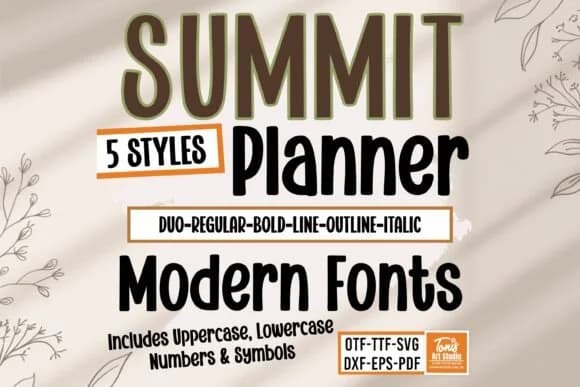
About Summit Planner Bundle Font
This slab serif balances geometric clarity with personality, making it work for both structured layouts and playful designs. Summit Planner Bundle by TonisArtStudio packs five distinct styles (Regular, Bold, Line, Outline, and Italic) that function as a cohesive system rather than standalone alternatives.
The bundle was built with planner spreads in mind, and it excels in that role. You'll find it equally effective in wedding invitation suites, custom t-shirt designs, and DIY craft signage. The letterforms have that minimalist confidence but with enough warmth to feel human, not corporate. Each style can stand alone for focused, professional work, or you can layer them for visual depth and complexity. The Outline version stacked with solid text reads with surprising elegance, while the Line style opens up flexible design options for borders, ornaments, and layered headline treatments that would take significantly longer to build from scratch in other tools.
Pair this bundle with a light sans-serif for body copy to keep everything readable without competing for attention. The contrast between the warm, structured slab serif and a clean, modern typeface works beautifully across everything from digital stationery to printed product labels. Grab the full bundle on Creative Fabrica and start building designs with a font family that actually functions like a system should.
Style & Use Cases
- Overall Style
- Sturdy, Confident, Planner Font
- Use Case
- Headlines, Merch
- Ideal For
- vintage posters, logos, and product packaging
- Pairs With
- a light sans-serif
How to Install Summit Planner Bundle Font
Step-by-step instructions for every platform
- 1Download the Summit Planner Bundle font file (.ttf or .otf).
- 2Locate the downloaded file in your Downloads folder.
- 3Right-click the font file.
- 4Select "Install" to install for the current user, or "Install for all users" to make it available system-wide.
- 5Summit Planner Bundle is now available in Word, Photoshop, Illustrator, and all other apps.
More by TonisArtStudio
View all →
Browse fonts by theme
Curated collections →Saw a font in a picture? Identify any font from an image with our free Font Finder.
More Slab Serif Fonts
Browse all →







What pairs well with Summit Planner Bundle Font?
Summit Planner Bundle Font is a slab serif font that shines as a display or heading face. Pair it with a clean sans-serif or serif font for body text — the contrast creates a clear hierarchy while the two styles stay balanced and easy to read.



Summit Planner Bundle Font
Reviewed by the FontBoxDL team · Updated October 2026