 Firefox
 1 / 8
1 / 8Loading font…
About College Distressed Font
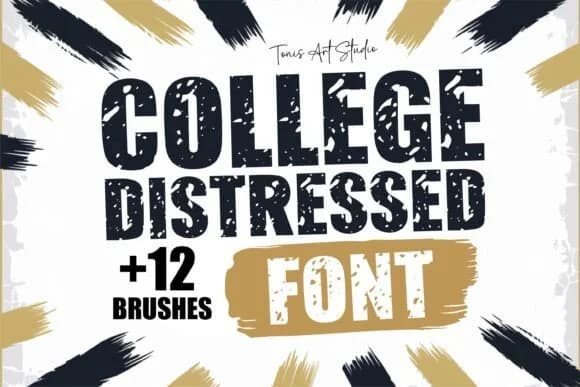
College Distressed by TonisArtStudio is a bold, worn slab-serif that captures the raw energy of vintage campus culture. The typeface is built with heavy distressing and texture throughout, creating that authentic aged quality that feels genuinely lived-in rather than cosmetic or merely decorative. This isn't a font for polished corporate work; it's built for projects that demand character and real grit, the kind you can't fake with post-production effects.
You'll find it works especially well on vintage college merchandise (hoodies, tees, varsity-style graphics), retro sports branding and athletic logos with serious swagger, beer label designs and craft brewery packaging, and DIY poster art with that classic dorm-room aesthetic. The distressed edges refuse to apologize, giving street-style energy to anything you apply it to. Pair it with clean backgrounds to let the texture do the talking, or layer it over patterns for maximum impact.
The package includes OTF and TTF formats, plus SVG, EPS, DXF, and PDF versions for cutting software, along with twelve textured brushes that let you push the grunge effect even further if the mood strikes. The full alphabet, numbers, and symbols are all here. Find College Distressed on Creative Fabrica and add genuine weathered authenticity to your next project.
Style & Use Cases
- Overall Style
- Sturdy, Confident, College Font
- Use Case
- Headlines, Merch
- Ideal For
- vintage posters, logos, and product packaging
- Pairs With
- a light sans-serif
How to Install College Distressed Font
Step-by-step instructions for every platform
- 1Download the College Distressed font file (.ttf or .otf).
- 2Locate the downloaded file in your Downloads folder.
- 3Right-click the font file.
- 4Select "Install" to install for the current user, or "Install for all users" to make it available system-wide.
- 5College Distressed is now available in Word, Photoshop, Illustrator, and all other apps.
More by TonisArtStudio
View all →
Browse fonts by theme
Curated collections →Saw a font in a picture? Identify any font from an image with our free Font Finder.
More Slab Serif Fonts
Browse all →







What pairs well with College Distressed Font?
College Distressed Font is a slab serif font that shines as a display or heading face. Pair it with a clean sans-serif or serif font for body text — the contrast creates a clear hierarchy while the two styles stay balanced and easy to read.



College Distressed Font
Reviewed by the FontBoxDL team · Updated October 2026