 Firefox
 1 / 8
1 / 8About Stryke Font
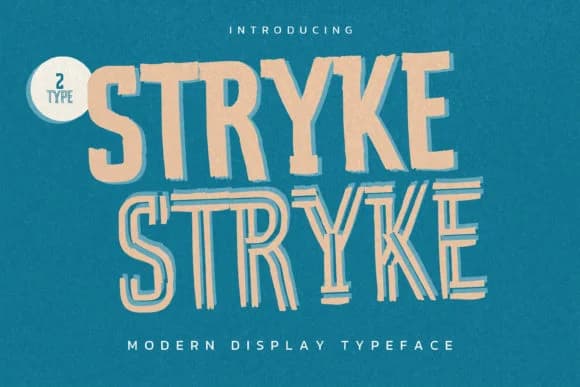
Stryke, designed by Gassstype Studio, is a slab serif built on structured confidence without sacrificing warmth. The letterforms feature generous serifs and decisive angles that position this typeface firmly in contemporary territory, yet the textured surface keeps it feeling handmade rather than clinical. That balance between authentic craft and modern polish is where Stryke finds its strength.
This font works across both display and branding applications, holding up at large poster sizes or scaled down within a logo lockup. Indie and artisanal brands seeking personality without pretense will connect with its genuine character immediately. Restaurant menus and full identity systems benefit from Stryke, as do vinyl record label artwork, independent cosmetics packaging, and podcast cover designs that need to grab attention. Book covers for contemporary fiction are another natural fit, along with modern wedding welcome signage and craft brewery label systems. The slab serif foundation keeps everything grounded and legible while the handmade undertone prevents the work from feeling corporate or sterile.
Designers building comprehensive brand systems where visual distinctiveness truly matters will find Stryke invaluable. Get it on Creative Fabrica.
Style & Use Cases
- Overall Style
- Sturdy, Confident, Textured
- Use Case
- Headlines, Merch
- Ideal For
- vintage posters, logos, and product packaging
- Pairs With
- a light sans-serif
How to Install Stryke Font
Step-by-step instructions for every platform
- 1Download the Stryke font file (.ttf or .otf).
- 2Locate the downloaded file in your Downloads folder.
- 3Right-click the font file.
- 4Select "Install" to install for the current user, or "Install for all users" to make it available system-wide.
- 5Stryke is now available in Word, Photoshop, Illustrator, and all other apps.
More by Gassstype Studio
View all →

Browse fonts by theme
Curated collections →Saw a font in a picture? Identify any font from an image with our free Font Finder.
More Slab Serif Fonts
Browse all →







What pairs well with Stryke Font?
Stryke Font is a slab serif font that shines as a display or heading face. Pair it with a clean sans-serif or serif font for body text — the contrast creates a clear hierarchy while the two styles stay balanced and easy to read.



Stryke Font
Reviewed by the FontBoxDL team · Updated September 2026