 Firefox
 1 / 5
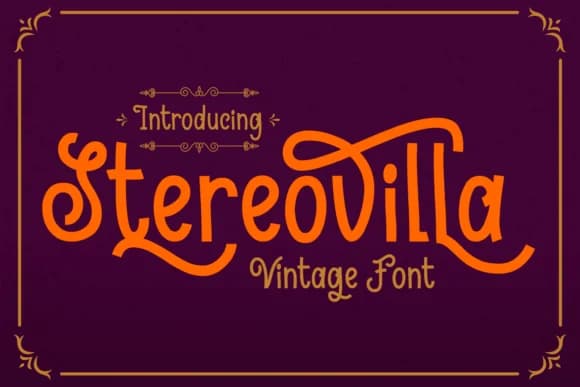
1 / 5About Stereovilla Font
This font captures vintage character with modern sophistication and visual restraint. Stereovilla, created by the design team at Dreamink (7ntypes), merges clean sans serif geometry with flowing, decorative swashes that bring personality and genuine visual interest to letterforms while maintaining refined, balanced proportions.
It excels in vintage brand systems, retro wedding invitation and paper goods sets, artisanal skincare and cosmetics product packaging, and indie music posters and album covers. As you increase the size, the font's decorative elements become increasingly expressive and sculptural, making them especially strong for headlines and focal points in a design. Used at smaller sizes for subheadings or supporting text, it maintains both legibility and personality without getting lost. Comprehensive character support with accented Latin glyphs means you can confidently deploy it for work targeting multiple languages and international markets.
Pair Stereovilla with a straightforward, grounded sans serif font for body copy and supporting text, letting the swashes carry the visual weight in headlines and key messaging areas. The contrast between ornate letterforms and minimal supporting fonts keeps everything feeling balanced, intentional, and cohesive rather than visually overwhelming. Find Stereovilla on Creative Fabrica and bring this retro-modern sensibility to your next branding or design project.
Style & Use Cases
- Overall Style
- Elegant, Flowing, Stereovilla
- Use Case
- Invitations, Branding
- Ideal For
- wedding stationery, greeting cards, and signatures
- Pairs With
- a simple uppercase sans
How to Install Stereovilla Font Font
Step-by-step instructions for every platform
- 1Download the Stereovilla Font font file (.ttf or .otf).
- 2Locate the downloaded file in your Downloads folder.
- 3Right-click the font file.
- 4Select "Install" to install for the current user, or "Install for all users" to make it available system-wide.
- 5Stereovilla Font is now available in Word, Photoshop, Illustrator, and all other apps.
More by Dreamink (7ntypes)
View all →
Browse fonts by theme
Curated collections →Saw a font in a picture? Identify any font from an image with our free Font Finder.
More Script Handwritten Fonts
Browse all →







What pairs well with Stereovilla Font?
Stereovilla Font is a script font that shines as a display or heading face. Pair it with a clean sans-serif or serif font for body text — the contrast creates a clear hierarchy while the two styles stay balanced and easy to read.



Stereovilla Font
Reviewed by the FontBoxDL team · Updated August 2026