 Firefox
 1 / 3
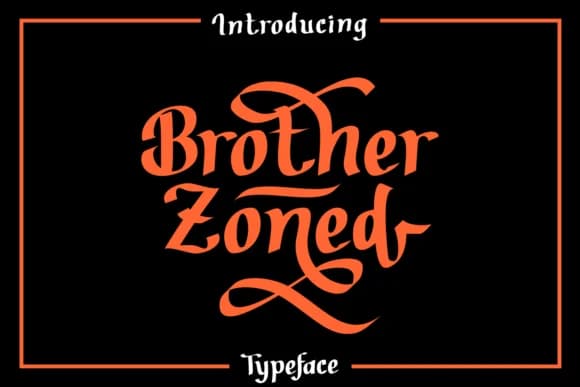
1 / 3About Brother Zoned Font
Imagine you're designing a hand-lettered poster for a local independent record shop or custom labels for a small-batch skincare line. Brother Zoned by Dreamink brings exactly that relaxed, human-made quality to your work. This handwritten typeface from 7ntypes carries genuine character in every stroke, the kind that fits perfectly in wedding invitation suites with a modern edge, indie podcast cover art, DIY vinyl sticker designs, and concert poster headers where a sterile, perfect font would completely derail the vibe.
The casual confidence of handwritten script shines especially bright when authenticity is the point. Merchandise labels for independent brands, zine covers, and hand-lettered social media graphics all benefit from Brother Zoned's unpolished, human rhythm. What stands out is how well it reads at large display sizes while keeping that sketch-like energy intact. You get a typeface that feels genuinely handmade without tipping into looking careless or rough. Both regular and italic versions give you the flexibility to add visual variation and emphasis without breaking the lived-in aesthetic.
Grab Brother Zoned on Creative Fabrica and bring that authentic, drawn-by-hand feel to your next project.
Style & Use Cases
- Overall Style
- Elegant, Flowing, Brother Zoned
- Use Case
- Invitations, Branding
- Ideal For
- wedding stationery, greeting cards, and signatures
- Pairs With
- a simple uppercase sans
How to Install Brother Zoned Font Font
Step-by-step instructions for every platform
- 1Download the Brother Zoned Font font file (.ttf or .otf).
- 2Locate the downloaded file in your Downloads folder.
- 3Right-click the font file.
- 4Select "Install" to install for the current user, or "Install for all users" to make it available system-wide.
- 5Brother Zoned Font is now available in Word, Photoshop, Illustrator, and all other apps.
More by Dreamink (7ntypes)
View all →
Browse fonts by theme
Curated collections →Saw a font in a picture? Identify any font from an image with our free Font Finder.
More Script Handwritten Fonts
Browse all →







What pairs well with Brother Zoned Font?
Brother Zoned Font is a script font that shines as a display or heading face. Pair it with a clean sans-serif or serif font for body text — the contrast creates a clear hierarchy while the two styles stay balanced and easy to read.



Brother Zoned Font
Reviewed by the FontBoxDL team · Updated September 2026