 Firefox
 1 / 9
1 / 9About Stellaria Font
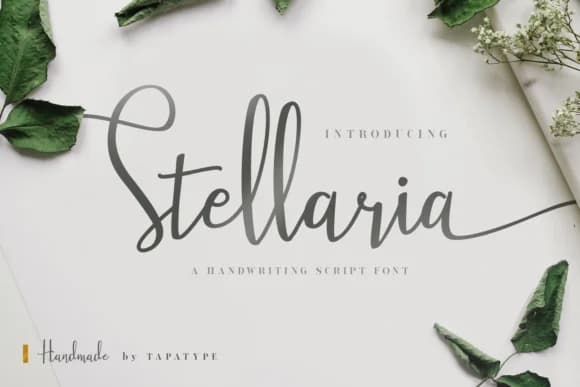
Stellaria by TapaType is a flowing handwritten brush script that captures the spontaneity of pen on paper while maintaining careful control. The sweeping letterforms and organic swashes create movement across the page, giving text a sophisticated, hand-touched quality that reads intentional and polished. This is a script that sits comfortably between playful and professional, never veering too far toward either extreme.
This script works beautifully for wedding invitation suites, where elegant texture and personality matter most. Boutique skincare packaging gains a genuine personal touch from the organic, fluid letterforms. Wine labels benefit from its natural baseline flow, while social media graphics for lifestyle and wellness brands gain real authenticity from the connected strokes. Small-batch food packaging also shines with this typeface, bringing warmth without sacrificing sophistication. The font includes an oblique variant, offering another angle for layering and creating visual interest in compositional work.
Stellaria suits designers building cohesive visual systems around handwritten texture without sacrificing legibility across different sizes. It brings warmth and personality to formal applications while maintaining the restraint needed for sophisticated brand identity work. The balance of accessibility and refinement makes it work across print and digital media alike. Grab it on Creative Fabrica and start layering it into your next project.
Style & Use Cases
- Overall Style
- Elegant, Flowing, Stellaria
- Use Case
- Invitations, Branding
- Ideal For
- wedding stationery, greeting cards, and signatures
- Pairs With
- a simple uppercase sans
How to Install Stellaria Font Font
Step-by-step instructions for every platform
- 1Download the Stellaria Font font file (.ttf or .otf).
- 2Locate the downloaded file in your Downloads folder.
- 3Right-click the font file.
- 4Select "Install" to install for the current user, or "Install for all users" to make it available system-wide.
- 5Stellaria Font is now available in Word, Photoshop, Illustrator, and all other apps.
More by TapaType
View all →

Browse fonts by theme
Curated collections →Saw a font in a picture? Identify any font from an image with our free Font Finder.
More Script Handwritten Fonts
Browse all →







What pairs well with Stellaria Font?
Stellaria Font is a script font that shines as a display or heading face. Pair it with a clean sans-serif or serif font for body text — the contrast creates a clear hierarchy while the two styles stay balanced and easy to read.



Stellaria Font
by TapaType
Reviewed by the FontBoxDL team · Updated May 2026