 Firefox
 1 / 8
1 / 8About Liberika Font
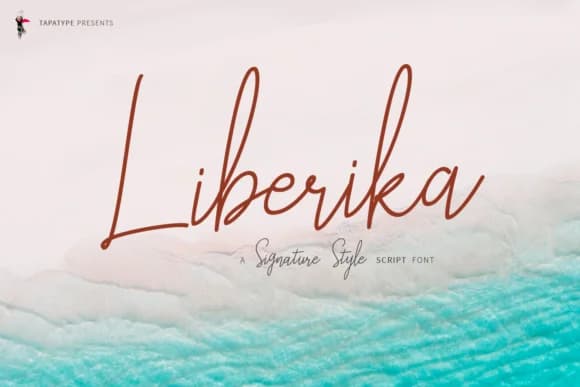
Liberika, designed by TapaType, flows with expressive curves that feel authentically handwritten without sacrificing legibility or refinement. The letterforms connect naturally, each stroke carrying its own rhythm and personality that draws the eye without demanding attention. Most script fonts force the issue by trying to mimic the hand too closely, resulting in something that looks either rigid or overly casual. Liberika threads that needle differently: it captures the organic movement of writing while maintaining structural clarity and intentional letterforms.
The typeface comes in two practical styles. The upright Regular works beautifully for clean, flowing layouts and body-sized display text, while the slanted Oblique adds dynamic energy and visual emphasis when you need a second voice within the same font family. This flexibility makes the pair ideal for luxury wedding invitation suites with matching response cards and envelope liners, high-end skincare and cosmetics packaging where typography needs to feel premium and trustworthy, editorial magazine spreads and feature covers, as well as boutique product labels for independent Etsy sellers and shop branding. The script walks a careful line between refined formality and human warmth, reading as professional and polished without feeling distant or impersonal.
Liberika belongs in the toolkit of designers who understand that character and functionality go hand in hand. Get it on Creative Fabrica.
Style & Use Cases
- Overall Style
- Elegant, Flowing, Liberika Regular
- Use Case
- Invitations, Branding
- Ideal For
- wedding stationery, greeting cards, and signatures
- Pairs With
- a simple uppercase sans
How to Install Liberika Font Font
Step-by-step instructions for every platform
- 1Download the Liberika Font font file (.ttf or .otf).
- 2Locate the downloaded file in your Downloads folder.
- 3Right-click the font file.
- 4Select "Install" to install for the current user, or "Install for all users" to make it available system-wide.
- 5Liberika Font is now available in Word, Photoshop, Illustrator, and all other apps.
More by TapaType
View all →

Browse fonts by theme
Curated collections →Saw a font in a picture? Identify any font from an image with our free Font Finder.
More Script Handwritten Fonts
Browse all →







What pairs well with Liberika Font?
Liberika Font is a script font that shines as a display or heading face. Pair it with a clean sans-serif or serif font for body text — the contrast creates a clear hierarchy while the two styles stay balanced and easy to read.



Liberika Font
by TapaType
Reviewed by the FontBoxDL team · Updated May 2026