 Firefox
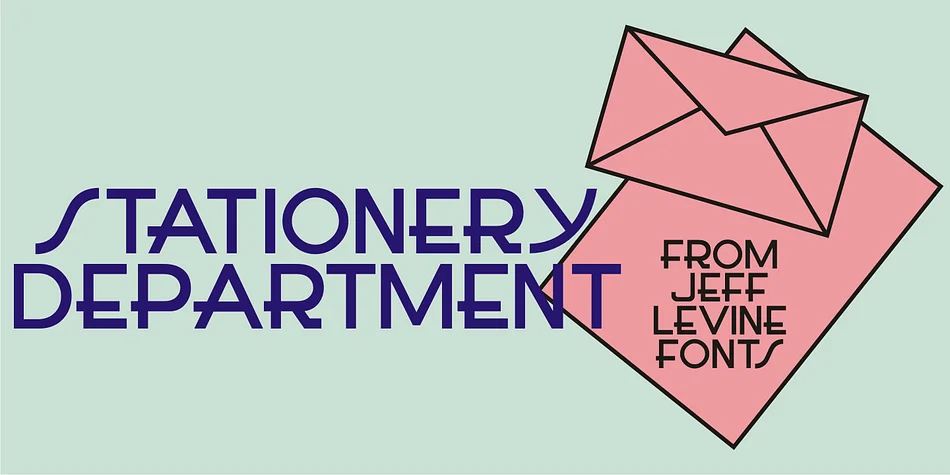
About STATIONERY DEPARTMENT JNL Font
This font carries the sleek, geometric confidence of Art Deco at its peak. STATIONERY DEPARTMENT JNL comes from Jeff Levine Fonts, drawn directly from the hand-lettered typography of a 1940s Herald Square carbon paper package sold at F.W. Woolworth stores. It captures the specific moment when streamlined letterforms meant modern luxury to everyday shoppers, and the feeling translates instantly across decades.
Use it for vintage wedding stationery suites where clients want authentic period detail without irony, speakeasy menu cards with genuine prohibition-era swagger, retro diner signage that actually looks like it belongs there, or vintage poster reproductions that need to feel genuinely mid-century. Boutique packaging labels for artisanal goods and vintage book cover recreations also work beautifully with its condensed, geometric letterforms. Headlines and display settings where you want real impact without fussiness are where it truly shines. Tight spacing and sharp angles give layouts an intentional, designed quality that reads as confident rather than nostalgic-for-nostalgia's-sake.
Pair it with a clean, minimalist sans-serif typeface for any body text to keep the vintage feel from overwhelming readers. Available on Creative Fabrica, this font opens up authentic 1940s aesthetics without the effort.
Style & Use Cases
- Overall Style
- Bold, Distinctive
- Use Case
- Headlines, Posters
- Ideal For
- logos, packaging, and standout titles
- Pairs With
- a neutral sans-serif
How to Install STATIONERY DEPARTMENT JNL Font
Step-by-step instructions for every platform
- 1Download the STATIONERY DEPARTMENT JNL font file (.ttf or .otf).
- 2Locate the downloaded file in your Downloads folder.
- 3Right-click the font file.
- 4Select "Install" to install for the current user, or "Install for all users" to make it available system-wide.
- 5STATIONERY DEPARTMENT JNL is now available in Word, Photoshop, Illustrator, and all other apps.
More by Jeff Levine Fonts
View all →



Browse fonts by theme
Curated collections →Saw a font in a picture? Identify any font from an image with our free Font Finder.
More Decorative Fonts
Browse all →







What pairs well with STATIONERY DEPARTMENT JNL Font?
STATIONERY DEPARTMENT JNL Font is a decorative font that shines as a display or heading face. Pair it with a clean sans-serif or serif font for body text — the contrast creates a clear hierarchy while the two styles stay balanced and easy to read.




STATIONERY DEPARTMENT JNL Font
Reviewed by the FontBoxDL team · Updated June 2026