
 1 / 8
1 / 8About Star Doodle Font
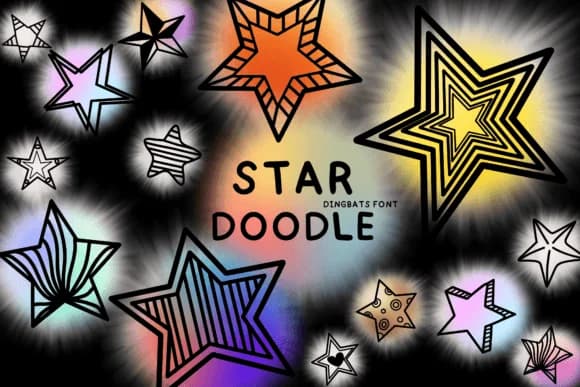
Star Doodle by Bee piyanuch is a hand-drawn dingbat collection brimming with cartoon charm and loose, sketchy line work throughout. The outlines feel genuinely personal, as if someone grabbed a brush and created these symbols without overthinking or smoothing rough edges. Each star and decorative element carries that raw, unpolished energy, with enough stroke variation that using them feels less like inserting generic clip art and more like drawing your own marks.
Greeting card designers reach for it to add instant character and playfulness to layouts. Sticker sheets for bullet journaling, custom book illustrations, and scrapbooking projects all benefit from the informal personality. Small business owners find it works beautifully for stamp-and-seal branding work that stands apart from the templated design alternatives flooding every market. The hand-drawn quality reads as genuinely craft-focused, which matters when connecting with audiences who value work that feels made by a real hand rather than generated by software.
Real visual diversity lives in this collection. You have enough marks and symbols to build a complete branded look or tie together a personal creative project without repetition. Grab Star Doodle on Creative Fabrica and bring this sketch-style energy into your designs.
Style & Use Cases
- Overall Style
- Iconographic, Doodle
- Use Case
- Icons, Accents
- Ideal For
- ornaments, bullets, and decorative flourishes
- Pairs With
- any text font
How to Install Star Doodle Font
Step-by-step instructions for every platform
- 1Download the Star Doodle font file (.ttf or .otf).
- 2Locate the downloaded file in your Downloads folder.
- 3Right-click the font file.
- 4Select "Install" to install for the current user, or "Install for all users" to make it available system-wide.
- 5Star Doodle is now available in Word, Photoshop, Illustrator, and all other apps.
More by Bee piyanuch
View all →
Browse fonts by theme
Curated collections →Saw a font in a picture? Identify any font from an image with our free Font Finder.
More Dingbats Fonts
Browse all →







What pairs well with Star Doodle Font?
Star Doodle Font is a versatile dingbats font that works for both headings and body text. Pair it with a contrasting sans-serif or serif font to add visual interest and a clear distinction between titles and body copy.



Star Doodle Font
by Bee piyanuch
Reviewed by the FontBoxDL team · Updated July 2026