
 1 / 8
1 / 8About Speech Bubbles Font
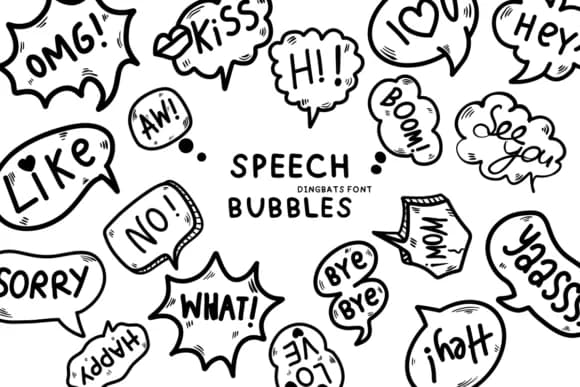
Speech Bubbles by Bee piyanuch is a dingbat typeface built entirely from dialogue balloons and thought clouds. Rather than a collection of generic shapes, each character offers something visually distinct: rounded speech bubbles, cloud-shaped callouts, angular comic-book style boxes, and thinking clouds. All are rendered with a sketch-like, hand-drawn quality that feels informal and conversational rather than corporate or clinical.
What makes this set genuinely useful is how it handles variation across so many different contexts. Comic artists and graphic novelists can vary their bubble styles within a single narrative without switching fonts mid-project. UX designers prototyping chat interfaces or conversation flows find the diverse bubble shapes essential for accurately showing how different types of messages appear in apps and interfaces. Illustrators rely on it for annotating doodles and labeling character sketches, while designers building scrapbooking layouts or hand-lettered greeting cards find the sketchy finish pairs naturally with hand-drawn visual elements. The playful, informal aesthetic also suits indie game dialogue sequences and educational signage, where communication benefits from visual warmth instead of rigid formality.
This is the font for projects rooted in conversation and character work, whether that's comic strips, visual novels, or craft-focused stationery design. Find Speech Bubbles on Creative Fabrica and start building expressive, dimensional dialogue into your work.
Style & Use Cases
- Overall Style
- Iconographic, Dialogue
- Use Case
- Icons, Accents
- Ideal For
- ornaments, bullets, and decorative flourishes
- Pairs With
- any text font
How to Install Speech Bubbles Font
Step-by-step instructions for every platform
- 1Download the Speech Bubbles font file (.ttf or .otf).
- 2Locate the downloaded file in your Downloads folder.
- 3Right-click the font file.
- 4Select "Install" to install for the current user, or "Install for all users" to make it available system-wide.
- 5Speech Bubbles is now available in Word, Photoshop, Illustrator, and all other apps.
More by Bee piyanuch
View all →
Browse fonts by theme
Curated collections →Saw a font in a picture? Identify any font from an image with our free Font Finder.
More Dingbats Fonts
Browse all →







What pairs well with Speech Bubbles Font?
Speech Bubbles Font is a versatile dingbats font that works for both headings and body text. Pair it with a contrasting sans-serif or serif font to add visual interest and a clear distinction between titles and body copy.



Speech Bubbles Font
by Bee piyanuch
Reviewed by the FontBoxDL team · Updated July 2026