
 1 / 8
1 / 8About Speech Bubble Text Font
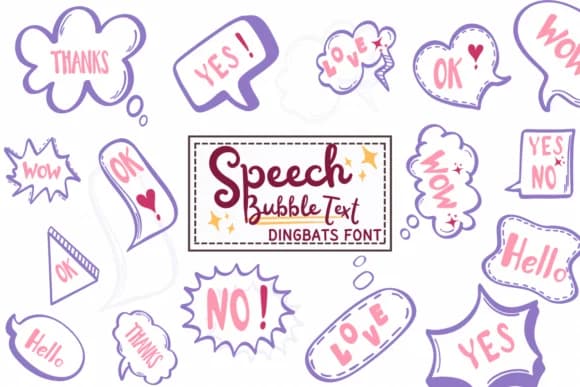
This font brings a conversational spark to designs that need personality and movement. Speech Bubble Text by PraewDesigns is a dingbat typeface where each character becomes a unique speech bubble or thought balloon instead of a traditional letter.
The bubbles work beautifully for comic strip layouts, where you can swap regular text for expressive dialogue containers that carry emotional weight. It's equally suited to greeting cards that blend words with visual storytelling, social media carousel posts showing conversations between characters, and playful signage that mimics thought clouds or chat bubbles. Since the font includes multiple bubble styles, you can repeat text in different shapes to create visual variety and break up walls of repeated language. This makes it especially useful for infographics with dialogue elements or instructional materials where speech balloons add clarity to complex concepts.
Pair Speech Bubble Text with a clean, readable sans-serif like Open Sans or Montserrat for body text or explanatory copy. This keeps your design balanced while letting the bubbles carry the conversation. Find it on Creative Fabrica, ready to bring dialogue and personality to your next piece.
Style & Use Cases
- Overall Style
- Iconographic, Speech Bubble Text
- Use Case
- Icons, Accents
- Ideal For
- ornaments, bullets, and decorative flourishes
- Pairs With
- any text font
How to Install Speech Bubble Text Font
Step-by-step instructions for every platform
- 1Download the Speech Bubble Text font file (.ttf or .otf).
- 2Locate the downloaded file in your Downloads folder.
- 3Right-click the font file.
- 4Select "Install" to install for the current user, or "Install for all users" to make it available system-wide.
- 5Speech Bubble Text is now available in Word, Photoshop, Illustrator, and all other apps.
More by PraewDesigns
View all →
Browse fonts by theme
Curated collections →Saw a font in a picture? Identify any font from an image with our free Font Finder.
More Dingbats Fonts
Browse all →







What pairs well with Speech Bubble Text Font?
Speech Bubble Text Font is a versatile dingbats font that works for both headings and body text. Pair it with a contrasting sans-serif or serif font to add visual interest and a clear distinction between titles and body copy.



Speech Bubble Text Font
by PraewDesigns
Reviewed by the FontBoxDL team · Updated July 2026