 Firefox
 1 / 8
1 / 8About Smora Font
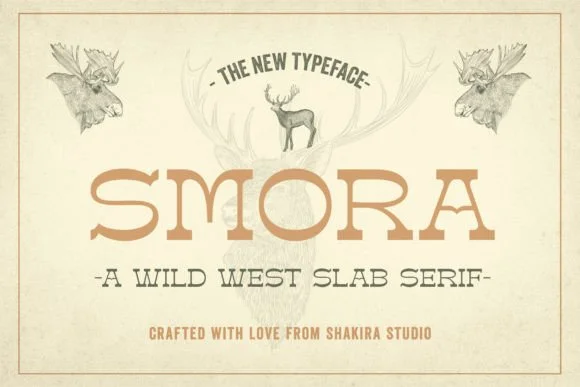
This is a font built for genuine boldness. Smora, designed by Shakira Studio, is a slab serif that channels Western authenticity with a contemporary edge, avoiding heavy-handed nostalgia.
The heavy, geometric letterforms work beautifully for retro bourbon bottle labels, vintage wedding invitation suites, classic diner menu designs, and boutique hotel signage that needs genuine timeless character. Record album covers, vintage-style product packaging, and retro poster designs are equally strong applications. The chunky serifs give it real presence without feeling stuck in the past, and it reads equally well in a 1950s aesthetic or a modern project layered with retro sensibility. There's enough personality here that it becomes the hero of a layout, yet it still plays nicely with other typefaces when you need it to share the stage. The weight and geometry make it work across sizes, from headlines to oversized display work, so you're not limited to a single use.
Pair Smora with a neutral sans-serif (a clean geometric type works beautifully) for any supporting text, and you'll get genuine visual contrast that lets the display work breathe and command attention. The combination delivers sophistication without sacrifice. Find it on Creative Fabrica and build designs that feel genuinely intentional and alive.
Style & Use Cases
- Overall Style
- Sturdy, Confident, Retro
- Use Case
- Headlines, Merch
- Ideal For
- vintage posters, logos, and product packaging
- Pairs With
- a light sans-serif
How to Install Smora Font
Step-by-step instructions for every platform
- 1Download the Smora font file (.ttf or .otf).
- 2Locate the downloaded file in your Downloads folder.
- 3Right-click the font file.
- 4Select "Install" to install for the current user, or "Install for all users" to make it available system-wide.
- 5Smora is now available in Word, Photoshop, Illustrator, and all other apps.
More by Shakira Studio
View all →
Browse fonts by theme
Curated collections →Saw a font in a picture? Identify any font from an image with our free Font Finder.
More Slab Serif Fonts
Browse all →







What pairs well with Smora Font?
Smora Font is a slab serif font that shines as a display or heading face. Pair it with a clean sans-serif or serif font for body text — the contrast creates a clear hierarchy while the two styles stay balanced and easy to read.




Smora Font
Reviewed by the FontBoxDL team · Updated August 2026