
 1 / 8
1 / 8About Skull Font
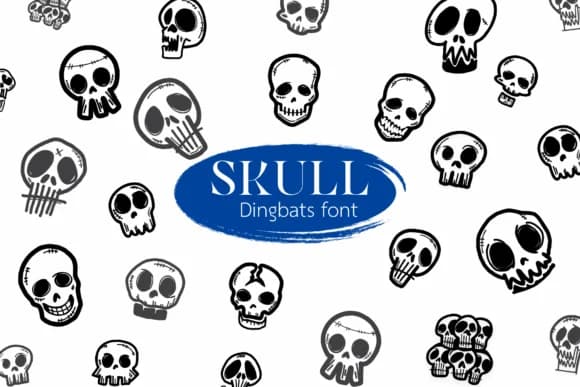
Imagine you're designing Halloween party invitations and need something bolder than generic clip art. Skull, a dingbat font by Suphitchaya, replaces each character with a different skull design, so typing instantly creates visual variety without hunting for individual graphics. This approach works particularly well for horror podcast cover artwork, merchandise print templates for alternative clothing brands, and craft sticker collections where you want each skull variant to feel genuinely distinct rather than repetitive.
Built as a symbol font, every keystroke produces a fresh skull shape, ranging from cartoony to anatomically influenced styles. At large sizes, the linework stays crisp and readable, making it ideal for everything from coloring page templates to vector illustration backdrops. Procreate, Affinity Designer, and Photo all recognize it without setup, so you can move from sketch to finished work without losing momentum.
Different characters unlock different skull designs, so take time to explore the full set before committing to your layout. You'll find the variety makes it easy to build cohesive collections without settling for repetition across a project. Grab Skull on Creative Fabrica and you'll have a whole visual toolkit ready to go.
Style & Use Cases
- Overall Style
- Iconographic, Fonts
- Use Case
- Icons, Accents
- Ideal For
- ornaments, bullets, and decorative flourishes
- Pairs With
- any text font
How to Install Skull Font
Step-by-step instructions for every platform
- 1Download the Skull font file (.ttf or .otf).
- 2Locate the downloaded file in your Downloads folder.
- 3Right-click the font file.
- 4Select "Install" to install for the current user, or "Install for all users" to make it available system-wide.
- 5Skull is now available in Word, Photoshop, Illustrator, and all other apps.
More by Suphitchaya
View all →
Browse fonts by theme
Curated collections →Saw a font in a picture? Identify any font from an image with our free Font Finder.
More Dingbats Fonts
Browse all →







What pairs well with Skull Font?
Skull Font is a versatile dingbats font that works for both headings and body text. Pair it with a contrasting sans-serif or serif font to add visual interest and a clear distinction between titles and body copy.



Skull Font
by Suphitchaya
Reviewed by the FontBoxDL team · Updated July 2026