 Firefox
 1 / 8
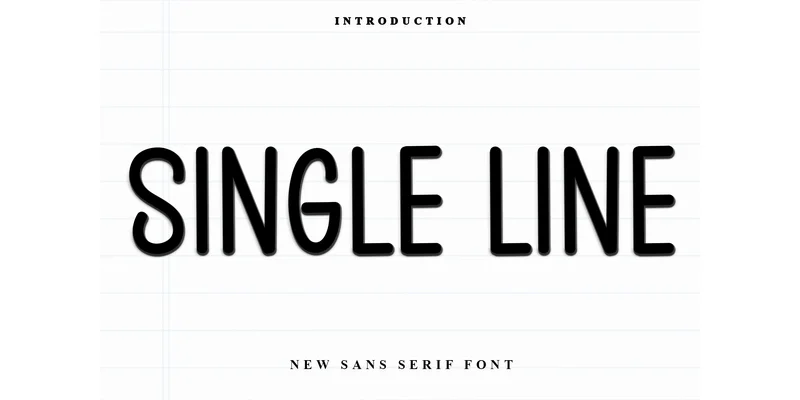
1 / 8About Single Line Font
Picture yourself designing a bold brand identity that needs to cut through visual noise with confidence and style. Single Line Font by Inermedia STUDIO delivers exactly that kind of presence. This sans serif brings a straightforward, unfussy quality that works across a wide range of applications, from logo lockups and vintage event signage to minimal editorial design, without losing its contemporary edge.
The font's clean, readable lines make it especially strong for apparel labels, retro band posters, and craft vinyl projects where legibility and attitude matter in equal measure. Minimal sticker designs, minimalist business card suites, and handwritten-inspired logo variations all gain character from its direct, confident approach. What sets it apart is how it balances contemporary simplicity with nostalgic warmth, giving your work dimension without relying on ornamental details or visual clutter that would distract from your message.
The full typeface includes multiple weights and comprehensive ligature options, which gives real flexibility to dial up personality when the design demands it. Its consistent structure and proportions hold steady across different sizes, from large signage down to small applications, making it reliable across any branding system or display context. Find Single Line Font on Creative Fabrica and start building work that commands genuine, lasting attention from your audience.
Style & Use Cases
- Overall Style
- Clean, Modern, 4th Of July
- Use Case
- Body Text, UI
- Ideal For
- branding, interfaces, and modern layouts
- Pairs With
- a contrasting serif for headings
How to Install Single Line Font Font
Step-by-step instructions for every platform
- 1Download the Single Line Font font file (.ttf or .otf).
- 2Locate the downloaded file in your Downloads folder.
- 3Right-click the font file.
- 4Select "Install" to install for the current user, or "Install for all users" to make it available system-wide.
- 5Single Line Font is now available in Word, Photoshop, Illustrator, and all other apps.
More by Inermedia STUDIO
View all →
Browse fonts by theme
Curated collections →Saw a font in a picture? Identify any font from an image with our free Font Finder.
More Sans Serif Fonts
Browse all →

What pairs well with Single Line Font?
Single Line Font is a versatile sans-serif font that works for both headings and body text. Pair it with a contrasting serif or slab serif font to add visual interest and a clear distinction between titles and body copy.


Single Line Font
Reviewed by the FontBoxDL team · Updated October 2026
One-time purchase