 Firefox
 1 / 8
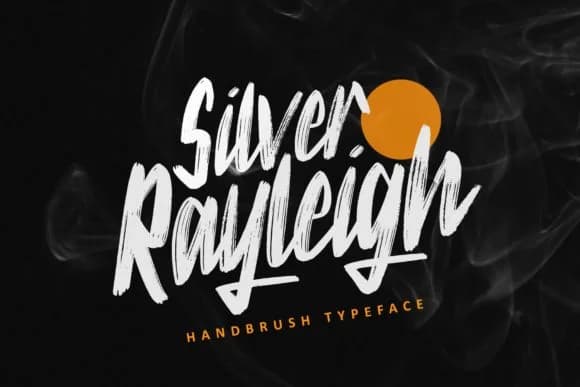
1 / 8About Silver Rayleigh Font
The flowing letterforms and generous spacing in Silver Rayleigh, designed by ZHR Creative, give this handwritten script a sophisticated rhythm that stays readable even at larger display sizes. Each letter carries a natural weight that suggests confidence without becoming theatrical or difficult to parse when used in longer text blocks. Generous baseline spacing and consistent stroke pressure create a font that looks personal yet professional, bringing genuine character to projects that need both visual impact and real legibility across different mediums.
This script excels on wedding invitation suites, where the fluid strokes catch light on premium cardstock and create visual warmth that printed sans-serifs simply cannot match. Boutique product labels gain handcrafted authenticity through this script, especially for artisanal tea packaging, small-batch candle branding, and luxury skincare containers destined for retail shelves. Greeting card designs, DIY craft signage, and custom monograms are equally at home here, where an authentic human touch matters far more than geometric precision or mechanical alignment.
Silver Rayleigh suits creatives and small business owners working on projects where handwritten aesthetics signal craft, care, and deliberate attention to detail. You'll find it on Creative Fabrica, ready to download and integrate into your next design commission or product launch.
Style & Use Cases
- Overall Style
- Elegant, Flowing, Silver Rayleigh
- Use Case
- Invitations, Branding
- Ideal For
- wedding stationery, greeting cards, and signatures
- Pairs With
- a simple uppercase sans
How to Install Silver Rayleigh Font Font
Step-by-step instructions for every platform
- 1Download the Silver Rayleigh Font font file (.ttf or .otf).
- 2Locate the downloaded file in your Downloads folder.
- 3Right-click the font file.
- 4Select "Install" to install for the current user, or "Install for all users" to make it available system-wide.
- 5Silver Rayleigh Font is now available in Word, Photoshop, Illustrator, and all other apps.
More by ZHR Creative
View all →

Browse fonts by theme
Curated collections →Saw a font in a picture? Identify any font from an image with our free Font Finder.
More Script Handwritten Fonts
Browse all →







What pairs well with Silver Rayleigh Font?
Silver Rayleigh Font is a script font that shines as a display or heading face. Pair it with a clean sans-serif or serif font for body text — the contrast creates a clear hierarchy while the two styles stay balanced and easy to read.



Silver Rayleigh Font
by ZHR Creative
Reviewed by the FontBoxDL team · Updated August 2026