
 1 / 8
1 / 8About Sign Dingbats Font
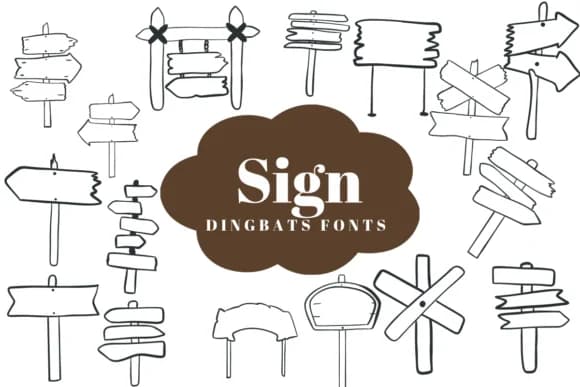
Sign Dingbats by Suphitchaya is a hand-drawn collection of directional icons and wooden signpost illustrations that bring casual, outdoor-inspired character to your work. The set includes pointing arrows, notice boards, and guidance symbols, each rendered with intentionally uneven line weight that reads as genuinely sketched rather than digitally polished. This imperfect quality is actually the whole point: the marks all read as authentically handmade, bringing warmth to rustic, folksy, or straightforward design approaches in equal measure.
Use this when creating scavenger hunt cards for birthday parties, designing vintage camping posters for outdoor themes, or building wayfinding systems for festivals and events where tactile charm genuinely matters to visitors. Coffee shop menu boards, event programs for countryside weddings, craft fair booth signage, and DIY printed merchandise all benefit from the personality these marks bring to a design. If you create products for outdoor recreation brands, illustrate navigation guides for hiking communities, or design handmade gift labels, thank you cards, and packaging, this font handles the directional visual work while keeping that genuine hand-lettered character. The full collection includes multiple icon variations and integrates with Procreate, Affinity Designer, and Affinity Photo. Find Sign Dingbats on Creative Fabrica to add these sketched directions into your design toolkit.
Style & Use Cases
- Overall Style
- Iconographic, Fonts
- Use Case
- Icons, Accents
- Ideal For
- ornaments, bullets, and decorative flourishes
- Pairs With
- any text font
How to Install Sign Dingbats Font
Step-by-step instructions for every platform
- 1Download the Sign Dingbats font file (.ttf or .otf).
- 2Locate the downloaded file in your Downloads folder.
- 3Right-click the font file.
- 4Select "Install" to install for the current user, or "Install for all users" to make it available system-wide.
- 5Sign Dingbats is now available in Word, Photoshop, Illustrator, and all other apps.
More by Suphitchaya
View all →
Browse fonts by theme
Curated collections →Saw a font in a picture? Identify any font from an image with our free Font Finder.
More Dingbats Fonts
Browse all →







What pairs well with Sign Dingbats Font?
Sign Dingbats Font is a versatile dingbats font that works for both headings and body text. Pair it with a contrasting sans-serif or serif font to add visual interest and a clear distinction between titles and body copy.



Sign Dingbats Font
by Suphitchaya
Reviewed by the FontBoxDL team · Updated June 2026