 Firefox
 1 / 5
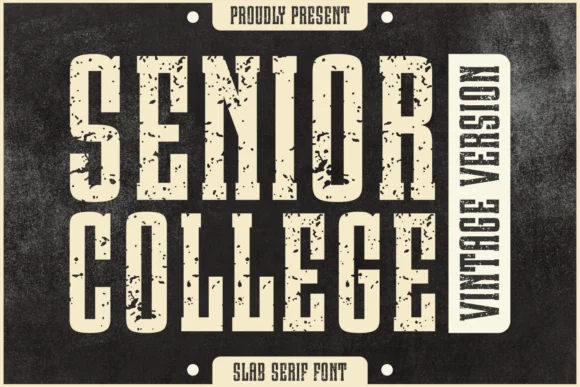
1 / 5About Senior College Vintage Font
Senior College Vintage, designed by Jasm at 7NTypes, is built on thick, confident letterforms that grab immediate attention. The heavy serifs and slightly weathered character deliver genuine vintage edge without feeling like a design cliche, and the sturdy weight carries real visual presence on any page.
The font works remarkably well across demanding applications where its bold structure shines. Vintage apparel branding benefits from its retro authority, while book cover design gains the classic gravitas this weight naturally carries. Greeting card suites and logotype work both suit its bold, readable nature. Package design for handmade goods or craft brands also showcases what makes this typeface genuinely useful: it reads strong at any size and doesn't fade visually. Magazine mastheads, editorial spreads, and pull quotes all gain impact from its slab structure.
The thick weight is its main technical strength, delivering strong legibility even when space is constrained. This font belongs in projects where the type itself needs to speak, whether that's a vintage-themed wedding invitation suite, Etsy product labels, or boutique packaging that demands real authority. Get Senior College Vintage on Creative Fabrica when you're ready to add that solid, grounded presence to your next project.
Style & Use Cases
- Overall Style
- Sturdy, Confident, Slab Serif Fonts
- Use Case
- Headlines, Merch
- Ideal For
- vintage posters, logos, and product packaging
- Pairs With
- a light sans-serif
How to Install Senior College Vintage Font
Step-by-step instructions for every platform
- 1Download the Senior College Vintage font file (.ttf or .otf).
- 2Locate the downloaded file in your Downloads folder.
- 3Right-click the font file.
- 4Select "Install" to install for the current user, or "Install for all users" to make it available system-wide.
- 5Senior College Vintage is now available in Word, Photoshop, Illustrator, and all other apps.
More by Jasm (7NTypes)
View all →


Browse fonts by theme
Curated collections →Saw a font in a picture? Identify any font from an image with our free Font Finder.
More Slab Serif Fonts
Browse all →






What pairs well with Senior College Vintage Font?
Senior College Vintage Font is a slab serif font that shines as a display or heading face. Pair it with a clean sans-serif or serif font for body text — the contrast creates a clear hierarchy while the two styles stay balanced and easy to read.




Senior College Vintage Font
Reviewed by the FontBoxDL team · Updated September 2026