
 1 / 8
1 / 8About Sea Doodle Font
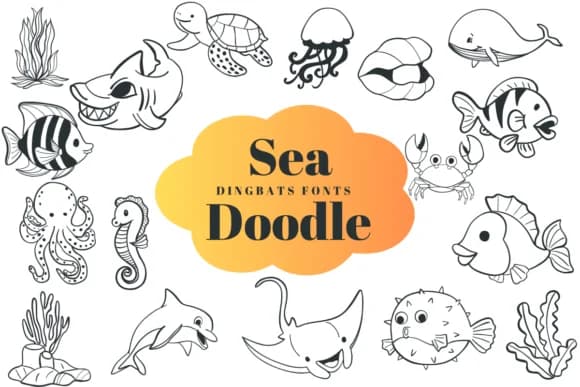
Sea Doodle by Suphitchaya is a hand-drawn dingbat collection packed with ocean creatures and underwater scenes. Whales, dolphins, coral, starfish, and jellyfish are all included, each rendered with a clean, bold outline. This gives you instant access to a library of marine icons. The outline style keeps everything crisp whether you resize, recolor, or add effects like shadows and gradients, making these characters work across digital projects, print materials, and everything in between.
This collection shines for specific work: educational worksheets about marine life, children's book illustrations, scrapbooking layouts, and hand-drawn product labels for bath and skincare brands. Since Sea Doodle works like a standard typeface (just type to place icons), you can build entire compositions from the character set without clipping or layers. The hand-doodled aesthetic feels personal and warm, which resonates when you're designing for younger audiences or brands that value craftsmanship.
The range runs from large creatures like whales down to small detailed ones like crabs, so there's usually something that fits your layout. Building a beach-themed invitation suite, illustrating a children's workbook, or creating stickers for a small shop becomes faster when you're working from a cohesive set rather than piecing together separate graphics. Get Sea Doodle on Creative Fabrica and start adding some personality to your next project.
Style & Use Cases
- Overall Style
- Iconographic, Fonts
- Use Case
- Icons, Accents
- Ideal For
- ornaments, bullets, and decorative flourishes
- Pairs With
- any text font
How to Install Sea Doodle Font
Step-by-step instructions for every platform
- 1Download the Sea Doodle font file (.ttf or .otf).
- 2Locate the downloaded file in your Downloads folder.
- 3Right-click the font file.
- 4Select "Install" to install for the current user, or "Install for all users" to make it available system-wide.
- 5Sea Doodle is now available in Word, Photoshop, Illustrator, and all other apps.
More by Suphitchaya
View all →

Browse fonts by theme
Curated collections →Saw a font in a picture? Identify any font from an image with our free Font Finder.
More Dingbats Fonts
Browse all →







What pairs well with Sea Doodle Font?
Sea Doodle Font is a versatile dingbats font that works for both headings and body text. Pair it with a contrasting sans-serif or serif font to add visual interest and a clear distinction between titles and body copy.



Sea Doodle Font
by Suphitchaya
Reviewed by the FontBoxDL team · Updated June 2026