
 1 / 3
1 / 3About Sea Divider Font
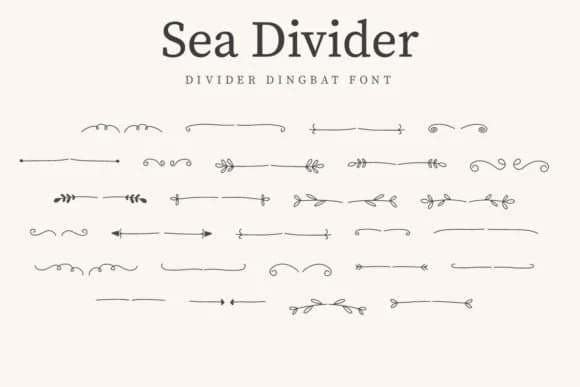
You're laying out a wedding invitation suite and need a border that feels organic and elegant without relying on the usual script fonts and swash characters. Sea Divider from CraftedType Studio is a dingbat font brimming with botanical dividers and leaf ornaments that flow naturally through layouts. This collection works especially well for wedding invitation suites, bridal shower stationery, and save-the-date cards where ornamental details need to feel hand-drawn and intentional rather than generic.
The font's nature-inspired borders and separators suit DIY botanical signs, scrapbooking layouts, and Etsy product labels for handmade goods. Each character is a complete ornamental element, so you can layer them to build custom borders or use individual pieces as accent marks throughout your design. Wedding programs, menu cards, and even simple product packaging all benefit from this flexible approach, where small leaf clusters or full divider lines help organize content without overwhelming the page. These characters sit comfortably at most sizes, giving you control over whether you want a subtle separating line or a dominant botanical feature.
Since you're working with pure dingbat elements, every keystroke delivers a usable ornament. Get Sea Divider on Creative Fabrica and start building botanical borders that feel natural and considered.
Style & Use Cases
- Overall Style
- Iconographic, Divider
- Use Case
- Icons, Accents
- Ideal For
- ornaments, bullets, and decorative flourishes
- Pairs With
- any text font
How to Install Sea Divider Font
Step-by-step instructions for every platform
- 1Download the Sea Divider font file (.ttf or .otf).
- 2Locate the downloaded file in your Downloads folder.
- 3Right-click the font file.
- 4Select "Install" to install for the current user, or "Install for all users" to make it available system-wide.
- 5Sea Divider is now available in Word, Photoshop, Illustrator, and all other apps.
More by CraftedType Studio
View all →



Browse fonts by theme
Curated collections →Saw a font in a picture? Identify any font from an image with our free Font Finder.
More Dingbats Fonts
Browse all →







What pairs well with Sea Divider Font?
Sea Divider Font is a versatile dingbats font that works for both headings and body text. Pair it with a contrasting sans-serif or serif font to add visual interest and a clear distinction between titles and body copy.



Sea Divider Font
Reviewed by the FontBoxDL team · Updated July 2026