 Firefox
 1 / 8
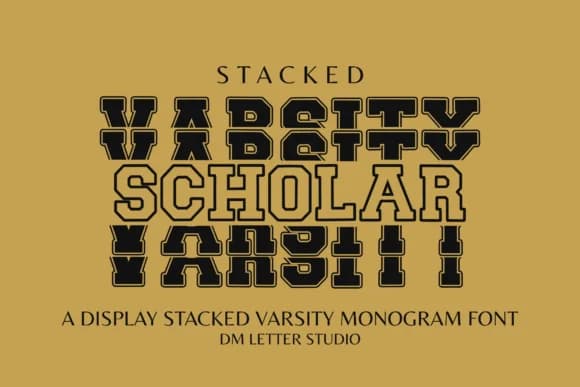
1 / 8About Scholar Varsity Font
Picture a high school student designing a custom monogram for her college letters, stacked vertically on a slim athletic patch. Scholar Varsity, created by Sharon of DmStudio, is built exactly for this moment. It's a bold slab-serif typeface that takes the classic varsity energy and locks it into a stacked monogram layout where each letter sits on top of the next, clean and uncompromising.
The two-line stacked format means you can pack initials into narrow spaces that would normally demand wider fonts. That's why it works so well for athletic patches, letterman jacket designs, and graduation class rings where vertical real estate counts. Boutique team merchandise, school spirit vinyl decals, and personalized monogram logos all benefit from this structure. The monoline weight and sharp all-caps style give it strength without fussiness, so it holds up whether you're sending it to a screen printer or cutting it on a vinyl cutter.
Pair it with a flowing script for contrast, or let the stacked letters stand alone as your hero type. Because it's a single weight with consistent spacing, it renders cleanly at any size and prints reliably on apparel, paper, or any material you throw at it. The result reads as refined and custom without trying too hard. You'll find Scholar Varsity on Creative Fabrica, ready to bring that athletic polish to your next monogram project.
Style & Use Cases
- Overall Style
- Sturdy, Confident, Stacked Varsity Monogram Font
- Use Case
- Headlines, Merch
- Ideal For
- vintage posters, logos, and product packaging
- Pairs With
- a light sans-serif
How to Install Scholar Varsity Font
Step-by-step instructions for every platform
- 1Download the Scholar Varsity font file (.ttf or .otf).
- 2Locate the downloaded file in your Downloads folder.
- 3Right-click the font file.
- 4Select "Install" to install for the current user, or "Install for all users" to make it available system-wide.
- 5Scholar Varsity is now available in Word, Photoshop, Illustrator, and all other apps.
More by Sharon ( DmStudio )
View all →

Browse fonts by theme
Curated collections →Saw a font in a picture? Identify any font from an image with our free Font Finder.
More Slab Serif Fonts
Browse all →







What pairs well with Scholar Varsity Font?
Scholar Varsity Font is a slab serif font that shines as a display or heading face. Pair it with a clean sans-serif or serif font for body text — the contrast creates a clear hierarchy while the two styles stay balanced and easy to read.



Scholar Varsity Font
Reviewed by the FontBoxDL team · Updated August 2026