 Firefox
 1 / 6
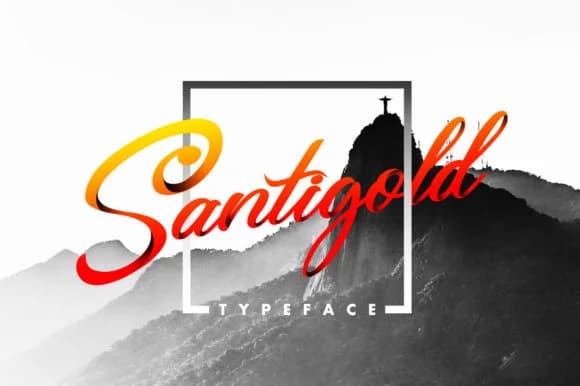
1 / 6About Santigold Font
The letterforms in this script strike a particular balance: elegant but not fragile, expressive but still legible in any context. Santigold, by 160 Studio, achieves this through connected strokes that suggest genuine handwriting without copying it directly, and curves that carry intention while avoiding the thin, sketchy quality that kills readability in many display scripts. Creating letterforms that feel individually considered rather than mass-produced is harder than it appears. This is a font that actually has personality rather than just claiming to.
The script shines in wedding invitation suites, custom packaging for artisanal brands, Etsy product labels, and hand-lettered event signage. It has warmth without the frothiness of overly decorative scripts. You can set it large across a headline with confidence, or use it for the secondary text on invitations and thank-you cards where legibility matters. Designers building small-batch stationery lines, boutique beauty brands, and indie product lines consistently find Santigold strikes the right balance between craft and polish. It feels less templated than what lives in standard font libraries, which is exactly what most small brands are looking for.
This works best for projects where the audience expects handmade quality but deserves actual legibility. Find Santigold on Creative Fabrica.
Style & Use Cases
- Overall Style
- Elegant, Flowing, Santigold
- Use Case
- Invitations, Branding
- Ideal For
- wedding stationery, greeting cards, and signatures
- Pairs With
- a simple uppercase sans
How to Install Santigold Font Font
Step-by-step instructions for every platform
- 1Download the Santigold Font font file (.ttf or .otf).
- 2Locate the downloaded file in your Downloads folder.
- 3Right-click the font file.
- 4Select "Install" to install for the current user, or "Install for all users" to make it available system-wide.
- 5Santigold Font is now available in Word, Photoshop, Illustrator, and all other apps.
More by 160 Studio
View all →

Browse fonts by theme
Curated collections →Saw a font in a picture? Identify any font from an image with our free Font Finder.
More Script Handwritten Fonts
Browse all →







What pairs well with Santigold Font?
Santigold Font is a script font that shines as a display or heading face. Pair it with a clean sans-serif or serif font for body text — the contrast creates a clear hierarchy while the two styles stay balanced and easy to read.



Santigold Font
by 160 Studio
Reviewed by the FontBoxDL team · Updated May 2026