 Firefox
 1 / 5
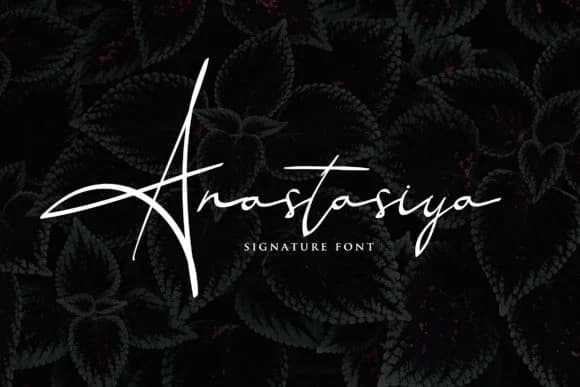
1 / 5About Anastasiya Font
This font captures something genuine: the intimate quality of a hand-signed note. Anastasiya Font by 160 Studio brings that authentic handwritten character to digital spaces, creating an immediate sense of personality and care that mass-produced typefaces struggle to achieve. The handwritten feel doesn't sacrifice elegance, instead adding depth to work that might otherwise feel impersonal.
Wedding invitation suites benefit from this style, where authenticity signals quality and attention. Luxury cosmetics brands use script fonts like this to convey craftsmanship on labels and packaging. Event monograms for formal stationery sets get a boost from the confident flow of the letterforms. Even personalized gift packaging and custom branding projects gain character when you choose something this intentional. Its flowing letterforms feel deliberate rather than casual, which gives the font surprising range across formal occasions and contemporary editorial layouts. The hand-drawn quality reads as premium and thoughtful, communicating both craftsmanship and care to your audience.
Pair Anastasiya with a light geometric sans-serif for projects that need visual balance, letting the script carry the emotional weight while the sans keeps body copy legible and modern. This combination maintains the handwritten charm without sacrificing readability across headlines, decorative elements, or social media graphics. When you're ready to work with it, grab this one on Creative Fabrica.
Style & Use Cases
- Overall Style
- Elegant, Flowing, Anastasiya
- Use Case
- Invitations, Branding
- Ideal For
- wedding stationery, greeting cards, and signatures
- Pairs With
- a simple uppercase sans
How to Install Anastasiya Font Font
Step-by-step instructions for every platform
- 1Download the Anastasiya Font font file (.ttf or .otf).
- 2Locate the downloaded file in your Downloads folder.
- 3Right-click the font file.
- 4Select "Install" to install for the current user, or "Install for all users" to make it available system-wide.
- 5Anastasiya Font is now available in Word, Photoshop, Illustrator, and all other apps.
More by 160 Studio
View all →

Browse fonts by theme
Curated collections →Saw a font in a picture? Identify any font from an image with our free Font Finder.
More Script Handwritten Fonts
Browse all →







What pairs well with Anastasiya Font?
Anastasiya Font is a script font that shines as a display or heading face. Pair it with a clean sans-serif or serif font for body text — the contrast creates a clear hierarchy while the two styles stay balanced and easy to read.



Anastasiya Font
by 160 Studio
Reviewed by the FontBoxDL team · Updated May 2026