 Firefox
 1 / 5
1 / 5About Sanpitch Font
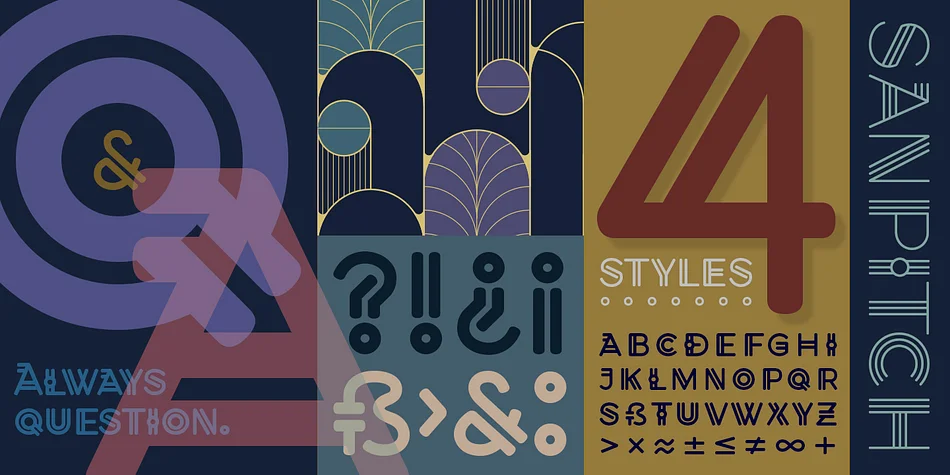
Sanpitch by Cory Maylett Design is a hand-drawn decorative typeface that started as a rough magazine headline sketch five years ago. The designer kept refining it periodically, and that initial concept gradually evolved into a complete family spanning four distinct weights. Each weight preserves the hand-lettered spirit while bringing its own visual presence and character to different design contexts.
The technical foundation is solid. OpenType features give you automatic fractions and alternate characters that activate in Adobe Creative Suite and Affinity apps, swapping glyphs automatically to improve visual harmony (you can override this anytime). The font ships with thousands of kerning pairs that maintain proper spacing even across awkward character combinations. Language support covers Western and Central European alphabets, making it reliable for international work without extra effort or limitations.
This typeface works beautifully for luxury cosmetics and skincare packaging, editorial magazine covers and feature spreads, vintage or retro branding systems, and formal wedding invitations or upscale event stationery. The hand-drawn quality brings genuine warmth and personality that purely digital typefaces struggle to match, while staying polished enough for professional applications across industries. Get the full four-weight family on Creative Fabrica and see how these weights transform your next project.
Style & Use Cases
- Overall Style
- Bold, Distinctive
- Use Case
- Headlines, Posters
- Ideal For
- logos, packaging, and standout titles
- Pairs With
- a neutral sans-serif
How to Install Sanpitch Font
Step-by-step instructions for every platform
- 1Download the Sanpitch font file (.ttf or .otf).
- 2Locate the downloaded file in your Downloads folder.
- 3Right-click the font file.
- 4Select "Install" to install for the current user, or "Install for all users" to make it available system-wide.
- 5Sanpitch is now available in Word, Photoshop, Illustrator, and all other apps.
More by Cory Maylett Design
View all →


Browse fonts by theme
Curated collections →Saw a font in a picture? Identify any font from an image with our free Font Finder.
More Decorative Fonts
Browse all →







What pairs well with Sanpitch Font?
Sanpitch Font is a decorative font that shines as a display or heading face. Pair it with a clean sans-serif or serif font for body text — the contrast creates a clear hierarchy while the two styles stay balanced and easy to read.




Sanpitch Font
Reviewed by the FontBoxDL team · Updated June 2026