 Firefox
 1 / 5
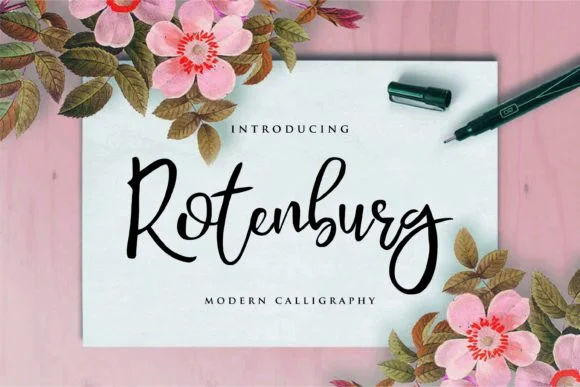
1 / 5About Rotenburg Font
Rotenburg, designed by aksarangga, distinguishes itself through a dancing baseline that energizes the script. This modern calligraphy merges the spontaneity of handwriting with the precision professional design demands, creating something that feels human without sacrificing refinement or legibility.
The moving baseline generates visual momentum across a page. That balance between refined forms and energetic movement works particularly well for wedding invitation suites, especially where traditional calligraphy feels too static and predictable. Luxury product packaging gains personality without compromising sophistication when rendered in Rotenburg. Greeting card layouts, event menus, boutique beauty labels, and custom brand stationery all showcase what this script does exceptionally well. Book jacket lettering and social media graphics are equally at home with its character. Throughout each application, Rotenburg maintains a handcrafted quality while staying polished and professional.
This font is built for designers and small business owners creating brand systems where authenticity and sophistication need to work together. Whether you're designing special occasion stationery or building a product packaging identity system, Rotenburg brings natural warmth and movement to professional work. Find it on Creative Fabrica and bring this playful, refined script into your type collection.
Style & Use Cases
- Overall Style
- Elegant, Flowing, Rotenburg
- Use Case
- Invitations, Branding
- Ideal For
- wedding stationery, greeting cards, and signatures
- Pairs With
- a simple uppercase sans
How to Install Rotenburg Font Font
Step-by-step instructions for every platform
- 1Download the Rotenburg Font font file (.ttf or .otf).
- 2Locate the downloaded file in your Downloads folder.
- 3Right-click the font file.
- 4Select "Install" to install for the current user, or "Install for all users" to make it available system-wide.
- 5Rotenburg Font is now available in Word, Photoshop, Illustrator, and all other apps.
More by aksarangga
View all →
Browse fonts by theme
Curated collections →Saw a font in a picture? Identify any font from an image with our free Font Finder.
More Script Handwritten Fonts
Browse all →







What pairs well with Rotenburg Font?
Rotenburg Font is a script font that shines as a display or heading face. Pair it with a clean sans-serif or serif font for body text — the contrast creates a clear hierarchy while the two styles stay balanced and easy to read.




Rotenburg Font
by aksarangga
Reviewed by the FontBoxDL team · Updated June 2026