 Firefox
 1 / 5
1 / 5About Rosenbaum Font
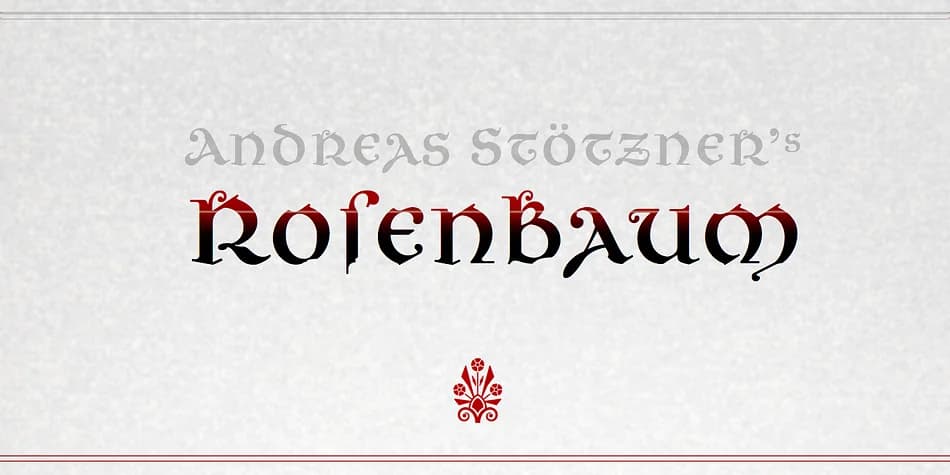
Rosenbaum, designed by Andreas Stötzner, combines the high contrast and refined stroke weight of a didone serif with the generous curves of uncial letterforms, creating something that reads as blackletter while remaining entirely free of historical constraints. The letterforms carry a distinctly literary sensibility, mixing classical influences in ways that feel oddly contemporary and strangely poetic.
This is a typeface for work that genuinely needs emotional weight and commanding visual presence. Wedding invitation suites benefit from its romantic sweep and decorative character, while fairytale and children's books find an immediate, expressive voice in these distinctive letterforms. It performs equally well on boutique skincare packaging or vintage-style restaurant menu cards, where it conveys real substance without slipping into mere pastiche. Editorial headings for literary magazines and small-press publications similarly gain considerable character and visual impact from its unconventional stroke proportions.
Both Rosenbaum Eins and Rosenbaum Rose ship with complete support for European languages, plus a thoughtfully curated range of ornamental symbols and zero-width calligraphic flourishes you can layer directly into words for subtle decorative effects. If your work calls for a typeface that feels genuinely distinctive rather than comfortable and generic, Rosenbaum translates well across print and digital applications. Get it on Creative Fabrica.
Style & Use Cases
- Overall Style
- Ornate, Gothic
- Use Case
- Logos, Certificates
- Ideal For
- medieval themes, band merch, and tattoo lettering
- Pairs With
- a clean sans-serif for body text
How to Install Rosenbaum Font
Step-by-step instructions for every platform
- 1Download the Rosenbaum font file (.ttf or .otf).
- 2Locate the downloaded file in your Downloads folder.
- 3Right-click the font file.
- 4Select "Install" to install for the current user, or "Install for all users" to make it available system-wide.
- 5Rosenbaum is now available in Word, Photoshop, Illustrator, and all other apps.
More by Andreas Stötzner
View all →

Browse fonts by theme
Curated collections →Saw a font in a picture? Identify any font from an image with our free Font Finder.
More Blackletter Fonts
Browse all →







What pairs well with Rosenbaum Font?
Rosenbaum Font is a blackletter font that shines as a display or heading face. Pair it with a clean serif or sans-serif font for body text — the contrast creates a clear hierarchy while the two styles stay balanced and easy to read.



Rosenbaum Font
Reviewed by the FontBoxDL team · Updated June 2026