 Firefox
 1 / 9
1 / 9About Roost Font
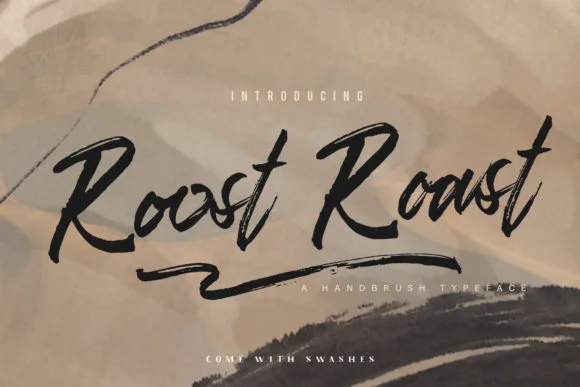
This font carries a loose, energetic quality that reads as handmade but intentional. Roost, designed by Kines.studio, is a brush script built on actual pen pressure dynamics. You can feel the varying line weight that only comes from genuine brushwork, and the letterforms maintain just enough quirk to feel approachable without veering into hard-to-read territory.
You'll want this for logo lockups that need genuine personality, especially for small cosmetic brands or local businesses where authenticity is the whole point. Wedding invitation suites benefit from its modern, slightly rebellious edge; it works for couples who don't want the predictable calligraphy route. Event posters, custom greeting card interiors, and boutique product labels all shine when paired with this kind of handdrawn texture. The script also carries weight in marketing materials when you need pull quotes or callout text that feels more human than your standard sans.
Since Roost has such pronounced character, it pairs really well with a minimal, clean typeface for body copy or secondary elements. Something geometric and modern creates the right contrast. Grab it on Creative Fabrica and you'll have a brush script that actually reads as crafted instead of templated.
Style & Use Cases
- Overall Style
- Elegant, Flowing, Brush Font
- Use Case
- Invitations, Branding
- Ideal For
- wedding stationery, greeting cards, and signatures
- Pairs With
- a simple uppercase sans
How to Install Roost Font
Step-by-step instructions for every platform
- 1Download the Roost font file (.ttf or .otf).
- 2Locate the downloaded file in your Downloads folder.
- 3Right-click the font file.
- 4Select "Install" to install for the current user, or "Install for all users" to make it available system-wide.
- 5Roost is now available in Word, Photoshop, Illustrator, and all other apps.
More by Kines.studio
View all →
Browse fonts by theme
Curated collections →Saw a font in a picture? Identify any font from an image with our free Font Finder.
More Script Handwritten Fonts
Browse all →







What pairs well with Roost Font?
Roost Font is a script font that shines as a display or heading face. Pair it with a clean sans-serif or serif font for body text — the contrast creates a clear hierarchy while the two styles stay balanced and easy to read.




Roost Font
by Kines.studio
Reviewed by the FontBoxDL team · Updated September 2026