 Firefox
 1 / 6
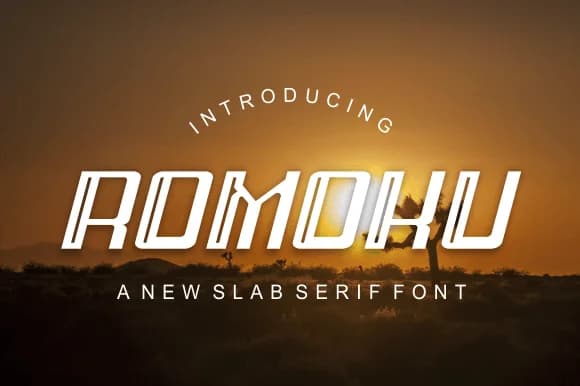
1 / 6About Romoku Font
Romoku by brahamb78 is a minimalist slab-serif that strikes a balance between warmth and structural restraint. The clean geometry and modern sensibility make it work beautifully across contexts where you need personality without visual clutter. Restaurant menus, editorial magazine spreads, and tech startup pitch decks all feel at home with this typeface. Coffee shop signage, indie music album packaging, and upscale artisanal product branding benefit equally from its refined approach to letterforms.
What makes Romoku effective is its refusal to over-perform or demand attention. The consistent stroke weight and straightforward character set give designers real breathing room while maintaining strong visual coherence across applications. From one-page flyers to comprehensive brand identity systems, the typeface stays legible and composed. The included italic variants open up new possibilities for layering emphasis and adding visual rhythm without disrupting the overall aesthetic or feeling forced.
The font sits comfortably in that rare middle ground between distinctive personality and calm neutrality. That balance works for designers building visual systems where every choice needs to feel intentional rather than trendy or templated. The straightforward construction means it scales well from small sizes to large display use. Grab Romoku on Creative Fabrica and see how a well-considered slab-serif shapes your next project.
Style & Use Cases
- Overall Style
- Sturdy, Confident, Alphabet
- Use Case
- Headlines, Merch
- Ideal For
- vintage posters, logos, and product packaging
- Pairs With
- a light sans-serif
How to Install Romoku Font
Step-by-step instructions for every platform
- 1Download the Romoku font file (.ttf or .otf).
- 2Locate the downloaded file in your Downloads folder.
- 3Right-click the font file.
- 4Select "Install" to install for the current user, or "Install for all users" to make it available system-wide.
- 5Romoku is now available in Word, Photoshop, Illustrator, and all other apps.
More by brahamb78
View all →
Browse fonts by theme
Curated collections →Saw a font in a picture? Identify any font from an image with our free Font Finder.
More Slab Serif Fonts
Browse all →







What pairs well with Romoku Font?
Romoku Font is a slab serif font that shines as a display or heading face. Pair it with a clean sans-serif or serif font for body text — the contrast creates a clear hierarchy while the two styles stay balanced and easy to read.



Romoku Font
by brahamb78
Reviewed by the FontBoxDL team · Updated September 2026