
 1 / 8
1 / 8About Retro Flower Vintage Font
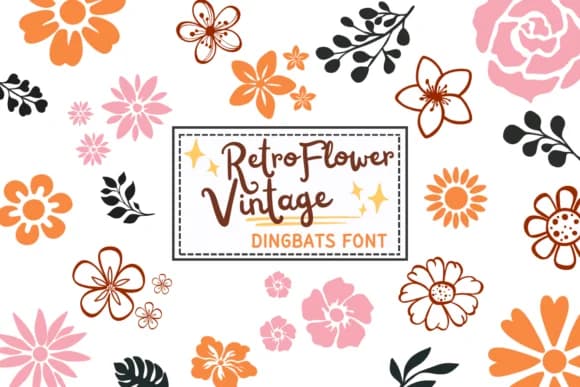
Retro Flower Vintage by PraewDesigns is a dingbat font where each character transforms into a distinct floral motif, bringing botanical charm to any composition. Instead of standard letterforms, you get hand-drawn flower shapes and botanical elements that feel both nostalgic and playful, creating a refreshing alternative for any decorative work.
This typeface excels on projects where vintage sensibility meets craft tradition and artisanal design. Wedding invitation suites gain romantic appeal from the floral grid of shapes, while Valentine's Day stationery and Thanksgiving menu cards benefit from instant warmth and character. Boho scrapbooking layouts, DIY craft labels, and boutique social media graphics all come alive with these petal-driven accents. The retro aesthetic particularly suits Etsy product packaging and handmade label designs that need personality without compromising legibility when paired with supporting text. Fashion-forward designers often layer these shapes as background textures or standalone decorative elements.
The font works best for seasonal campaigns, vintage branding, and nature-inspired creative work where decorative impact matters more than readability of actual text. It's particularly useful for anyone building a library of botanical design elements for repeated use across projects. Available on Creative Fabrica, this font delivers the charm of hand-drawn florals without requiring illustration skills.
Style & Use Cases
- Overall Style
- Iconographic, Retro Flower Vintage
- Use Case
- Icons, Accents
- Ideal For
- ornaments, bullets, and decorative flourishes
- Pairs With
- any text font
How to Install Retro Flower Vintage Font
Step-by-step instructions for every platform
- 1Download the Retro Flower Vintage font file (.ttf or .otf).
- 2Locate the downloaded file in your Downloads folder.
- 3Right-click the font file.
- 4Select "Install" to install for the current user, or "Install for all users" to make it available system-wide.
- 5Retro Flower Vintage is now available in Word, Photoshop, Illustrator, and all other apps.
More by PraewDesigns
View all →
Browse fonts by theme
Curated collections →Saw a font in a picture? Identify any font from an image with our free Font Finder.
More Dingbats Fonts
Browse all →







What pairs well with Retro Flower Vintage Font?
Retro Flower Vintage Font is a versatile dingbats font that works for both headings and body text. Pair it with a contrasting sans-serif or serif font to add visual interest and a clear distinction between titles and body copy.



Retro Flower Vintage Font
by PraewDesigns
Reviewed by the FontBoxDL team · Updated June 2026