 Firefox
 1 / 2
1 / 2About Rendezvous Font
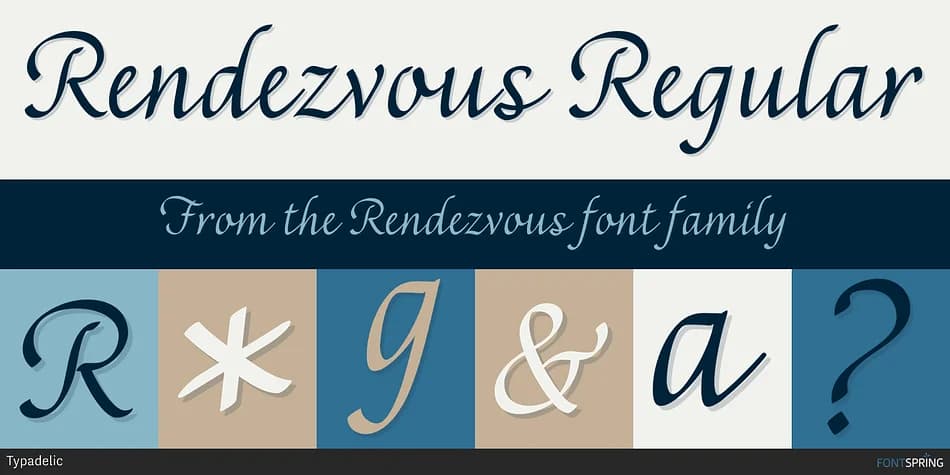
The flowing letterforms of Rendezvous, designed by Typadelic, strike that rare balance between formality and everyday approachability. Each character connects with a natural rhythm, creating a handwritten quality that feels intentional rather than improvised. The smooth curves pull the eye forward, making even short text feel graceful and considered. This script works beautifully for wedding invitation suites, where the elegance of the letterforms sets the entire tone of the stationery, and equally well for luxury cosmetic and skincare labels where a personal touch signals attention to detail and genuine quality.
Beyond formal occasions, Rendezvous excels at bringing sophistication to projects that need warmth without affectation. Greeting card designs benefit from its refined character, as do restaurant menu headers and upscale event branding materials that call for a human element. Small business owners and Etsy sellers use scripts like this for product packaging, vintage-style labels, and branded materials where typography becomes part of the brand identity itself. The calligraphic style reads as polished and professional without feeling dated, overwrought, or like it's trying too hard.
This font suits creative professionals and small business owners who want their work to feel handcrafted and intentional. If you're building a library of scripts with real personality, find Rendezvous on Creative Fabrica.
Style & Use Cases
- Overall Style
- Elegant, Flowing
- Use Case
- Invitations, Branding
- Ideal For
- wedding stationery, greeting cards, and signatures
- Pairs With
- a simple uppercase sans
How to Install Rendezvous Font
Step-by-step instructions for every platform
- 1Download the Rendezvous font file (.ttf or .otf).
- 2Locate the downloaded file in your Downloads folder.
- 3Right-click the font file.
- 4Select "Install" to install for the current user, or "Install for all users" to make it available system-wide.
- 5Rendezvous is now available in Word, Photoshop, Illustrator, and all other apps.
More by Typadelic
View all →

Browse fonts by theme
Curated collections →Saw a font in a picture? Identify any font from an image with our free Font Finder.
More Script Handwritten Fonts
Browse all →







What pairs well with Rendezvous Font?
Rendezvous Font is a script font that shines as a display or heading face. Pair it with a clean sans-serif or serif font for body text — the contrast creates a clear hierarchy while the two styles stay balanced and easy to read.



Rendezvous Font
by Typadelic
Reviewed by the FontBoxDL team · Updated July 2026