 Firefox
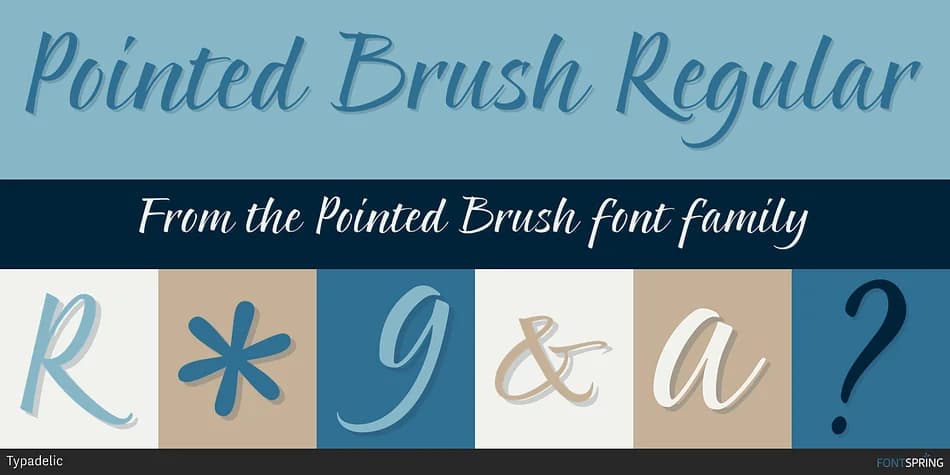
About Pointed Brush Font
The flowing letterforms of Pointed Brush by Typadelic faithfully mimic the dynamic shifts of a pointed brush calligraphy stroke, where ink line weight thickens and thins with the natural pressure of every movement. As a digital script, it preserves the nuanced hand-painted qualities and authenticity that calligraphers achieve with traditional tools, while remaining highly functional and versatile for contemporary design applications.
Editorial designers frequently reach for this script for magazine feature headlines and article openings, while packaging design specialists use it for upscale cosmetics and artisanal goods labels that need refined visual presence. Event designers appreciate its elegant sophistication for formal wedding invitation suites and place card designs. Boutique brands value the distinctive character it adds to visual identity systems, and illustrators successfully integrate it into greeting card collections, custom stationery suites, and vinyl decal layouts where the calligraphic letterforms become the design's primary focal point.
Pointed Brush appeals most to designers and brand owners who truly need a sophisticated script that maintains genuine warmth and personality in every letter. You can find it on Creative Fabrica, where it's ready to bring hand-drawn refinement and character to print and digital projects where visual polish and authenticity matter equally.
Style & Use Cases
- Overall Style
- Elegant, Flowing
- Use Case
- Invitations, Branding
- Ideal For
- wedding stationery, greeting cards, and signatures
- Pairs With
- a simple uppercase sans
How to Install Pointed Brush Font
Step-by-step instructions for every platform
- 1Download the Pointed Brush font file (.ttf or .otf).
- 2Locate the downloaded file in your Downloads folder.
- 3Right-click the font file.
- 4Select "Install" to install for the current user, or "Install for all users" to make it available system-wide.
- 5Pointed Brush is now available in Word, Photoshop, Illustrator, and all other apps.
More by Typadelic
View all →

Browse fonts by theme
Curated collections →Saw a font in a picture? Identify any font from an image with our free Font Finder.
More Script Handwritten Fonts
Browse all →







What pairs well with Pointed Brush Font?
Pointed Brush Font is a script font that shines as a display or heading face. Pair it with a clean sans-serif or serif font for body text — the contrast creates a clear hierarchy while the two styles stay balanced and easy to read.



Pointed Brush Font
by Typadelic
Reviewed by the FontBoxDL team · Updated July 2026