 Firefox
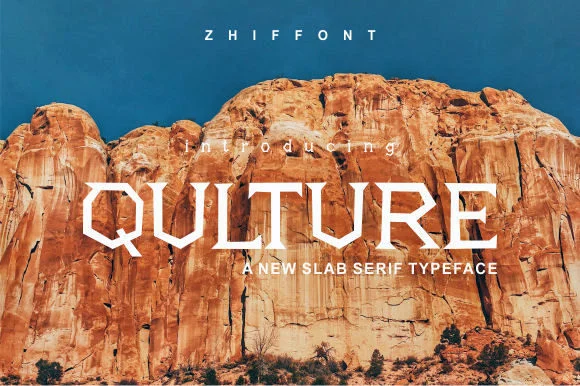 1 / 7
1 / 7About Qulture Font
Thick, geometric letterforms with an industrial edge define Qulture, a slab serif designed by Zhiffont that refuses to whisper or blend into the background. The blocky serifs and compact proportions deliver a muscular typeface with equal parts contemporary polish and raw directness, constructed for work that commands immediate visual impact without compromise or apology.
This is the typeface for tech startup pitch decks where a forward-thinking, no-nonsense aesthetic matters, heavy music and entertainment branding that genuinely needs an edge, architectural signage and wayfinding systems that speak with authority, and editorial mastheads in design-forward publications. You'll find equally strong application in product labels for craft packaging and specialty goods, streetwear hang tags and apparel branding, gig posters advertising live events, and social media graphics where sheer boldness cuts through endless visual noise. The type covers latin character sets thoroughly, handling international projects with solid confidence across multiple languages and regional markets.
Any design calling for real grit paired with contemporary strength finds its answer in Qulture. Grab it on Creative Fabrica and start working it into projects that truly deserve its full intensity and presence.
Style & Use Cases
- Overall Style
- Sturdy, Confident, Typrface
- Use Case
- Headlines, Merch
- Ideal For
- vintage posters, logos, and product packaging
- Pairs With
- a light sans-serif
How to Install Qulture Font
Step-by-step instructions for every platform
- 1Download the Qulture font file (.ttf or .otf).
- 2Locate the downloaded file in your Downloads folder.
- 3Right-click the font file.
- 4Select "Install" to install for the current user, or "Install for all users" to make it available system-wide.
- 5Qulture is now available in Word, Photoshop, Illustrator, and all other apps.
Browse fonts by theme
Curated collections →Saw a font in a picture? Identify any font from an image with our free Font Finder.
More Slab Serif Fonts
Browse all →







What pairs well with Qulture Font?
Qulture Font is a slab serif font that shines as a display or heading face. Pair it with a clean sans-serif or serif font for body text — the contrast creates a clear hierarchy while the two styles stay balanced and easy to read.




Qulture Font
by Zhiffont
Reviewed by the FontBoxDL team · Updated September 2026