
 1 / 8
1 / 8About Pumkinz Font
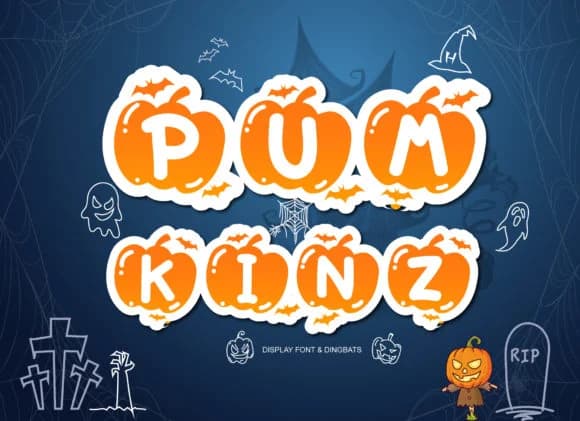
This font radiates silly, spooky fun that kids instantly recognize and designers love to use. Pumkinz, designed by BB Type Studios, is a dingbats collection stuffed with Halloween icons that dance between adorable and slightly eerie, giving your projects that playful, mischievous trick-or-treat energy.
The character set shines for Halloween greeting cards, trick-or-treat bag labels, and sublimation projects where you want strong visual impact without leaning on type. School party invitations, classroom decoration printables, and even DIY costume contest flyers come alive through these icons, since the glyphs carry most of the communicative weight. The full character set includes pumpkins, ghosts, bats, zombies, and other seasonal symbols, each rendered with that childlike charm that pulls in both kids designing their own layouts and adults working on holiday crafts. You get genuine coverage across the Halloween theme without resorting to photorealistic or overly ornate graphics.
Pair Pumkinz with a clean, readable sans-serif like Inter or Poppins for any body copy or labels, so the dingbats stay your design's visual anchor. Get this collection on Creative Fabrica and you're set for the whole Halloween season.
Style & Use Cases
- Overall Style
- Iconographic, Playful
- Use Case
- Icons, Accents
- Ideal For
- ornaments, bullets, and decorative flourishes
- Pairs With
- any text font
How to Install Pumkinz Font
Step-by-step instructions for every platform
- 1Download the Pumkinz font file (.ttf or .otf).
- 2Locate the downloaded file in your Downloads folder.
- 3Right-click the font file.
- 4Select "Install" to install for the current user, or "Install for all users" to make it available system-wide.
- 5Pumkinz is now available in Word, Photoshop, Illustrator, and all other apps.
More by BB Type Studios
View all →


Browse fonts by theme
Curated collections →Saw a font in a picture? Identify any font from an image with our free Font Finder.
More Dingbats Fonts
Browse all →







What pairs well with Pumkinz Font?
Pumkinz Font is a versatile dingbats font that works for both headings and body text. Pair it with a contrasting sans-serif or serif font to add visual interest and a clear distinction between titles and body copy.



Pumkinz Font
Reviewed by the FontBoxDL team · Updated July 2026