 Firefox
 1 / 6
1 / 6About Primot Pro Font
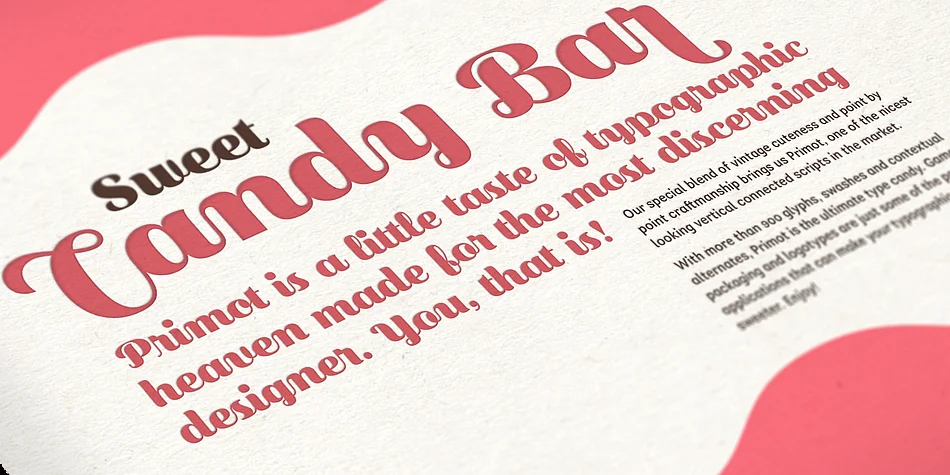
Picture a hand-painted sign above an Italian gelato shop, letters flowing vertically down the storefront. Behind Primot Pro is designer Plau's take on what a vertical script could be: a brush-lettered typeface inspired by gelato shop traditions and vintage scripts, but rethought with unusual vertical connections and soft, flourished endings that feel both organic and intentional.
Primot Pro shines for projects where handwritten character sets the whole mood. Wine label designs, boutique skincare packaging, artisan chocolate wrappers, and custom wedding invitation suites all benefit from this script's personality. Plau equipped Primot Pro with hand-lettering intelligence baked in: over 900 glyphs total, initial and final letter forms that swap automatically, contextual alternates, and swashes that feel genuinely drawn by hand. This depth means the same word subtly shifts from one use to the next.
Where Primot really lives is at large display sizes. The vertical flow and brush details make each word read as a small piece of art on its own. It works equally well as a logo lockup or a restaurant menu header. Grab Primot Pro on Creative Fabrica and bring this handwritten warmth to your next project.
Style & Use Cases
- Overall Style
- Elegant, Flowing
- Use Case
- Invitations, Branding
- Ideal For
- wedding stationery, greeting cards, and signatures
- Pairs With
- a simple uppercase sans
How to Install Primot Pro Font
Step-by-step instructions for every platform
- 1Download the Primot Pro font file (.ttf or .otf).
- 2Locate the downloaded file in your Downloads folder.
- 3Right-click the font file.
- 4Select "Install" to install for the current user, or "Install for all users" to make it available system-wide.
- 5Primot Pro is now available in Word, Photoshop, Illustrator, and all other apps.
Browse fonts by theme
Curated collections →Saw a font in a picture? Identify any font from an image with our free Font Finder.
More Script Handwritten Fonts
Browse all →







What pairs well with Primot Pro Font?
Primot Pro Font is a script font that shines as a display or heading face. Pair it with a clean sans-serif or serif font for body text — the contrast creates a clear hierarchy while the two styles stay balanced and easy to read.




Primot Pro Font
by Plau
Reviewed by the FontBoxDL team · Updated July 2026