
 1 / 9
1 / 9About Portculliard Font
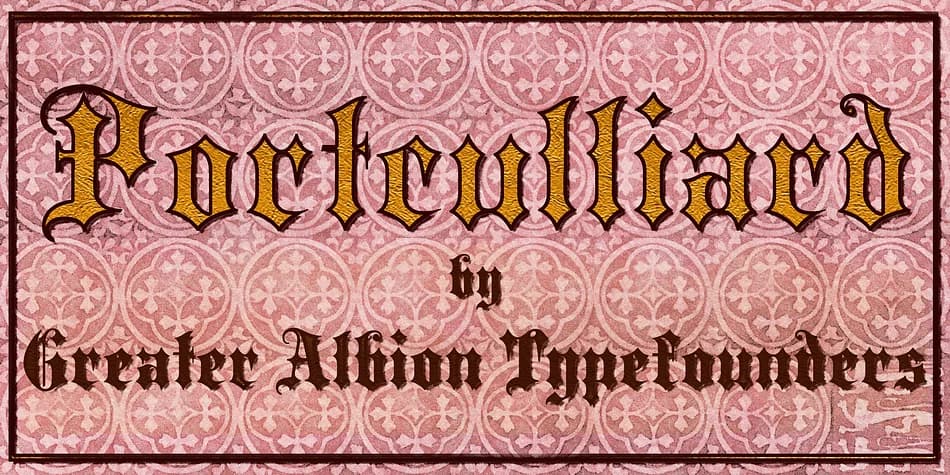
Medieval blackletter reaches its full potential when every letterform demonstrates both precision and substantial visual weight. Portculliard, designed by Greater Albion Typefounders, channels this principle through deliberately sturdy characters that feel genuinely grounded in historical craft and purpose. The design refuses ornamental excess, instead trusting the inherent geometry of each letter to carry its own meaning and authority. There's something particularly magnetic about blackletter that commits fully to weight and structure rather than relying on decorative flourish or surface appeal.
This font speaks directly to designers working on wedding invitation suites where historical atmosphere enhances modern sophistication and visual refinement. It excels on vintage apothecary labels and premium beauty product packaging where period authenticity becomes an essential part of the brand story and customer experience. Book covers for historical fiction and fantasy narratives benefit substantially from its grave, authoritative presence and textured weight. Historical document reproduction and manuscript recreation projects find their natural home in these distinctive letterforms. Even contemporary applications like tattoo design concepts and tabletop game materials draw unexpected authority and presence from the font's unwavering structural commitment.
You'll find Portculliard on Creative Fabrica, ready for any project that genuinely demands the quiet confidence of period-rooted design work.
Style & Use Cases
- Overall Style
- Ornate, Gothic
- Use Case
- Logos, Certificates
- Ideal For
- medieval themes, band merch, and tattoo lettering
- Pairs With
- a clean sans-serif for body text
How to Install Portculliard Font
Step-by-step instructions for every platform
- 1Download the Portculliard font file (.ttf or .otf).
- 2Locate the downloaded file in your Downloads folder.
- 3Right-click the font file.
- 4Select "Install" to install for the current user, or "Install for all users" to make it available system-wide.
- 5Portculliard is now available in Word, Photoshop, Illustrator, and all other apps.
More by Greater Albion Typefounders
View all →
Browse fonts by theme
Curated collections →Saw a font in a picture? Identify any font from an image with our free Font Finder.
More Blackletter Fonts
Browse all →







What pairs well with Portculliard Font?
Portculliard Font is a blackletter font that shines as a display or heading face. Pair it with a clean serif or sans-serif font for body text — the contrast creates a clear hierarchy while the two styles stay balanced and easy to read.



Portculliard Font
by Greater Albion Typefounders
Reviewed by the FontBoxDL team · Updated June 2026