 Firefox
 1 / 7
1 / 7About Points Font
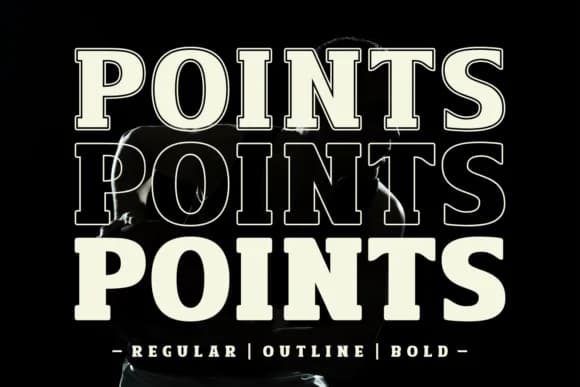
Points hits with a bold, geometric confidence that commands immediate attention on every application and medium. Created by Riman of 7NTypes, this slab serif carries clean angles and an unapologetically modern spine that translates beautifully across print and screen alike. The typeface reads as both refined and contemporary, making it surprisingly versatile despite its strong visual personality.
The design handles sophisticated branding work with genuine presence, from boutique skincare packaging and cosmetics labels to high-end apparel tags and carefully crafted logotypes that demand real authority and visual weight. Magazine mastheads and book covers benefit from its structured letterforms, which anchor editorial layouts and pull focus through quote sequences with undeniable presence. The regular and bold weights give you flexibility in layering hierarchy without forcing awkward compromises between size and readability across different formats.
An outline version expands your options for dimensional cover treatments and stacked typography effects that pop on product shelves and promotional display work. Pair Points with a neutral geometric sans-serif to keep body copy readable and balanced while the slab drives the visual hierarchy in headlines and section breaks throughout your designs. Get it from Creative Fabrica to start building your next identity system with confidence.
Style & Use Cases
- Overall Style
- Sturdy, Confident, Slab Serif Fonts
- Use Case
- Headlines, Merch
- Ideal For
- vintage posters, logos, and product packaging
- Pairs With
- a light sans-serif
How to Install Points Font
Step-by-step instructions for every platform
- 1Download the Points font file (.ttf or .otf).
- 2Locate the downloaded file in your Downloads folder.
- 3Right-click the font file.
- 4Select "Install" to install for the current user, or "Install for all users" to make it available system-wide.
- 5Points is now available in Word, Photoshop, Illustrator, and all other apps.
More by Riman (7NTypes)
View all →
Browse fonts by theme
Curated collections →Saw a font in a picture? Identify any font from an image with our free Font Finder.
More Slab Serif Fonts
Browse all →







What pairs well with Points Font?
Points Font is a slab serif font that shines as a display or heading face. Pair it with a clean sans-serif or serif font for body text — the contrast creates a clear hierarchy while the two styles stay balanced and easy to read.



Points Font
Reviewed by the FontBoxDL team · Updated August 2026