
 1 / 3
1 / 3About Pink Leaves Font
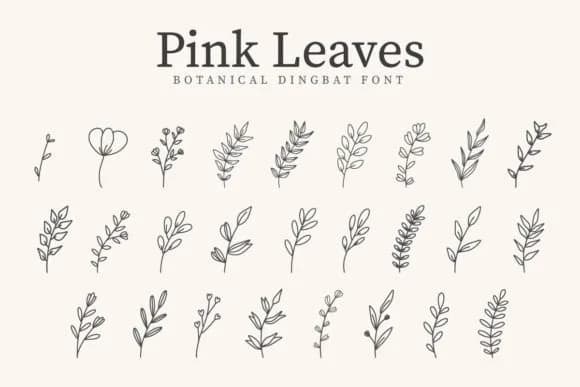
This font carries a soft, romantic spirit that evokes pressed petals and garden sketches. Pink Leaves, designed by CraftedType Studio, is a dingbat typeface where every character unfolds as a carefully drawn botanical element, from delicate leaves to layered floral ornaments.
The versatility here spans wedding invitation suites (where the botanical elegance adds heirloom quality), sticker design sheets for craft shops and makers, small-batch skincare packaging and cosmetics labels, and decorative craft signs for home decor projects. Beyond these specifics, the font serves as a flexible icon set: leaf shapes work as standalone symbols or as connective ornaments between text blocks. Designers often use it to texture backgrounds, create visual breathing room, or add a naturalistic element to layouts that might otherwise feel austere.
What makes this work in practice is the range of leaf forms and the consistency of the stroke weight. You get enough variety to feel organic without becoming busy or hard to read as an overall composition. Pair Pink Leaves with a clean, modern sans-serif like a simple geometric typeface when you want readable text sitting alongside the botanical detail without competing for attention. Pick it up on Creative Fabrica and add it to your toolkit for projects that need that natural, handcrafted touch.
Style & Use Cases
- Overall Style
- Iconographic, Botanical Fonts
- Use Case
- Icons, Accents
- Ideal For
- ornaments, bullets, and decorative flourishes
- Pairs With
- any text font
How to Install Pink Leaves Font
Step-by-step instructions for every platform
- 1Download the Pink Leaves font file (.ttf or .otf).
- 2Locate the downloaded file in your Downloads folder.
- 3Right-click the font file.
- 4Select "Install" to install for the current user, or "Install for all users" to make it available system-wide.
- 5Pink Leaves is now available in Word, Photoshop, Illustrator, and all other apps.
More by CraftedType Studio
View all →



Browse fonts by theme
Curated collections →Saw a font in a picture? Identify any font from an image with our free Font Finder.
More Dingbats Fonts
Browse all →







What pairs well with Pink Leaves Font?
Pink Leaves Font is a versatile dingbats font that works for both headings and body text. Pair it with a contrasting sans-serif or serif font to add visual interest and a clear distinction between titles and body copy.



Pink Leaves Font
Reviewed by the FontBoxDL team · Updated July 2026