 Firefox
 1 / 6
1 / 6About Perusak Font
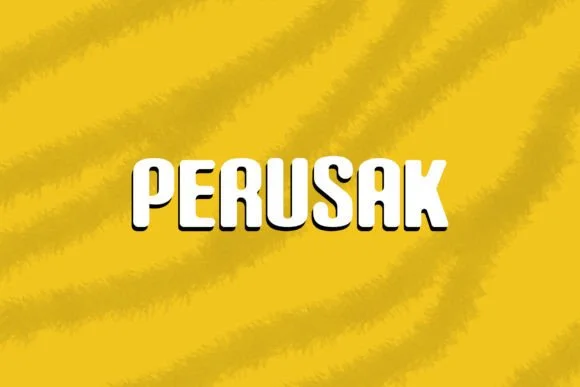
This typeface feels approachable and bold at the same time, striking a balance most fonts miss. Perusak, created by Nickhard, is a hand-drawn slab serif that blends contemporary structure with genuine character. The letters sit solid and distinctive, with organic edges that prevent the design from feeling stiff or overly corporate.
You'll find it works beautifully for artisan product packaging, independent coffee shop menus, vintage-inspired event posters, and custom craft label suites. Fashion boutiques and design studios reach for typefaces like this for brand identity work because they convey personality without sacrificing legibility or impact. The font arrives in OTF format and imports cleanly into Photoshop, Illustrator, and most other professional design tools. It performs equally well at large sizes for headlines or at smaller scales for decorative accents, and the consistent hand-drawn quality keeps everything visually cohesive across different applications and layouts.
The design truly shines best when you give it room to breathe. Pairing it with a clean, minimal sans-serif for body text creates a strong visual hierarchy and lets Perusak do what it does best: draw the eye and establish mood. Head to Creative Fabrica to add this one to your library.
Style & Use Cases
- Overall Style
- Sturdy, Confident, Nickhard
- Use Case
- Headlines, Merch
- Ideal For
- vintage posters, logos, and product packaging
- Pairs With
- a light sans-serif
How to Install Perusak Font
Step-by-step instructions for every platform
- 1Download the Perusak font file (.ttf or .otf).
- 2Locate the downloaded file in your Downloads folder.
- 3Right-click the font file.
- 4Select "Install" to install for the current user, or "Install for all users" to make it available system-wide.
- 5Perusak is now available in Word, Photoshop, Illustrator, and all other apps.
Browse fonts by theme
Curated collections →Saw a font in a picture? Identify any font from an image with our free Font Finder.
More Slab Serif Fonts
Browse all →







What pairs well with Perusak Font?
Perusak Font is a slab serif font that shines as a display or heading face. Pair it with a clean sans-serif or serif font for body text — the contrast creates a clear hierarchy while the two styles stay balanced and easy to read.




Perusak Font
by Nickhard
Reviewed by the FontBoxDL team · Updated September 2026