
 1 / 8
1 / 8About Pattern Doodle Font
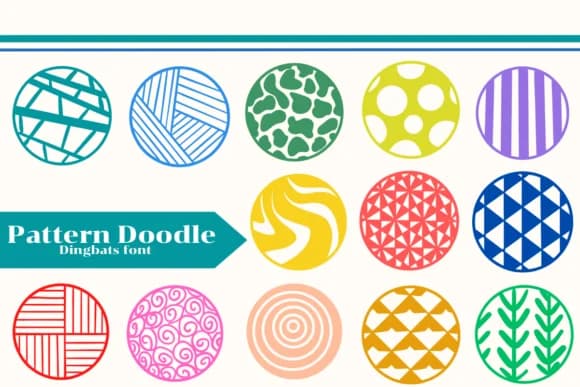
This font feels like doodling with a smile, a visual escape hatch for designers who want something energetic but not chaotic. Pattern Doodle, designed by Apiwat Type, is a dingbat collection built around geometric mark-making and playful circular motifs that suggest movement without overwhelming the eye. The set includes swirls, stippled textures, linear grids, and creature silhouettes that work equally well as standalone elements or tiled repeats. It ships in both OTF and TTF formats, with a full alphabet plus an extensive library of symbol alternates, making it flexible across Illustrator, Affinity Designer, and Procreate.
The real strength here is versatility at small scales. Use it to generate custom wallpaper patterns, build repeating backgrounds for children's picture books, create layered fabric print designs, design packaging for handmade goods, or produce decorative elements for greeting cards and stationery. You can also layer these marks as textural overlays over other type, or stitch them together to create custom doodle borders and frames for social media graphics. Pair it with a clean, modest sans-serif like Open Sans or Montserrat for any typographic labeling, so the doodles stay visually distinct and let the geometry shine. Grab Pattern Doodle from Creative Fabrica to start building playful, mark-driven work.
Style & Use Cases
- Overall Style
- Iconographic, Fonts
- Use Case
- Icons, Accents
- Ideal For
- ornaments, bullets, and decorative flourishes
- Pairs With
- any text font
How to Install Pattern Doodle Font
Step-by-step instructions for every platform
- 1Download the Pattern Doodle font file (.ttf or .otf).
- 2Locate the downloaded file in your Downloads folder.
- 3Right-click the font file.
- 4Select "Install" to install for the current user, or "Install for all users" to make it available system-wide.
- 5Pattern Doodle is now available in Word, Photoshop, Illustrator, and all other apps.
More by Apiwat Type
View all →

Browse fonts by theme
Curated collections →Saw a font in a picture? Identify any font from an image with our free Font Finder.
More Dingbats Fonts
Browse all →







What pairs well with Pattern Doodle Font?
Pattern Doodle Font is a versatile dingbats font that works for both headings and body text. Pair it with a contrasting sans-serif or serif font to add visual interest and a clear distinction between titles and body copy.



Pattern Doodle Font
by Apiwat Type
Reviewed by the FontBoxDL team · Updated June 2026