
 1 / 7
1 / 7About Pattern Font
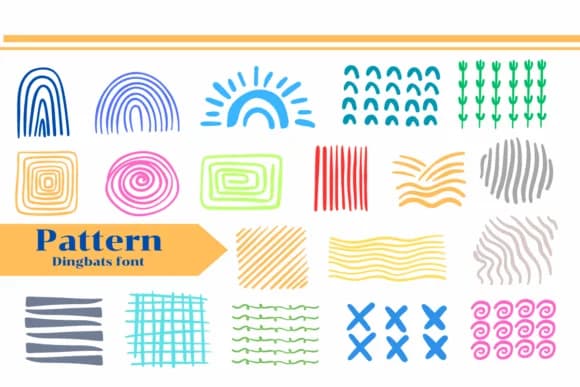
Pattern by Apiwat Type is a playful dingbats font that brings hand-drawn geometric shapes, flowing lines, and decorative pattern elements together into one versatile set. The collection includes squiggles, spirals, striped fills, and abstract motifs designed to stack and layer beautifully, giving you a flexible toolkit for building custom textures, visual backgrounds, and rich visual interest without falling back on standard stock graphics.
This font shines for boho wedding stationery suites where subtle geometric warmth and human touch set the right tone, children's book illustration and page design where personality truly moves the work forward, textile and fabric print projects that need custom pattern fills and visual character, and printable coloring page layouts you want to feel crafted and complete. Use these glyphs to create product labels for small makers and Etsy sellers, fill large spaces on modern greeting cards and invitations with visual energy and motion, or construct repeating abstract patterns for boutique packaging and branding identity work. The collection ships in both OTF and TTF formats with full compatibility for Procreate, Affinity Designer, and Affinity Photo, so you can work across whatever tools you prefer.
Grab Pattern from Creative Fabrica today and start layering your own textured designs into every project.
Style & Use Cases
- Overall Style
- Iconographic, Fonts
- Use Case
- Icons, Accents
- Ideal For
- ornaments, bullets, and decorative flourishes
- Pairs With
- any text font
How to Install Pattern Font
Step-by-step instructions for every platform
- 1Download the Pattern font file (.ttf or .otf).
- 2Locate the downloaded file in your Downloads folder.
- 3Right-click the font file.
- 4Select "Install" to install for the current user, or "Install for all users" to make it available system-wide.
- 5Pattern is now available in Word, Photoshop, Illustrator, and all other apps.
More by Apiwat Type
View all →
Browse fonts by theme
Curated collections →Saw a font in a picture? Identify any font from an image with our free Font Finder.
More Dingbats Fonts
Browse all →







What pairs well with Pattern Font?
Pattern Font is a versatile dingbats font that works for both headings and body text. Pair it with a contrasting sans-serif or serif font to add visual interest and a clear distinction between titles and body copy.



Pattern Font
by Apiwat Type
Reviewed by the FontBoxDL team · Updated June 2026