
 1 / 5
1 / 5About Nurse Leaves Font
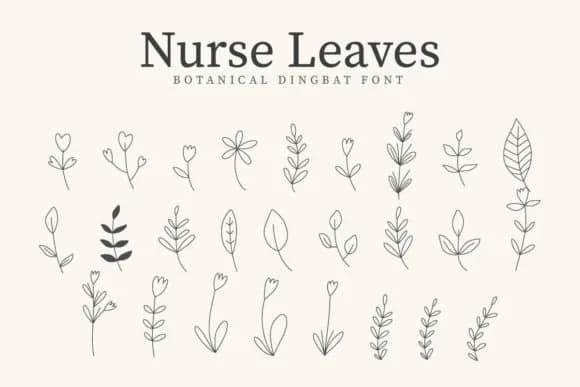
You're designing sticker sheets for your small business and need leaf illustrations that feel genuinely hand-drawn without the time and effort required to create them from scratch. Nurse Leaves by CraftedType Studio is a dingbat font loaded with intricate leaf glyphs that solves this exact problem. Rather than hunting through image libraries, you type to access a complete set of decorative leaf elements. This speeds production for custom product labels, scrapbook layouts, DIY gift packaging, and other craft projects where botanical accents give the work a handmade feel.
The font suits multiple practical applications. Bullet journal spreads gain visual interest when you weave leaf details throughout to frame weekly intentions and dividers. Greeting card sets and thank-you designs gain character with the leaf accents. Sticker sheets, clothing graphics, and invitation suites all benefit from thoughtful leaf accents that layer organically. With multiple glyph variations, you can compose complete designs without falling back on the same repeated image.
Each leaf glyph works at any size, scaling smoothly from large signage down to tiny embellishments on craft projects. The consistency means these elements work across print and digital alike. Find Nurse Leaves on Creative Fabrica and start using these glyphs in your work.
Style & Use Cases
- Overall Style
- Iconographic, Nurse Leaves
- Use Case
- Icons, Accents
- Ideal For
- ornaments, bullets, and decorative flourishes
- Pairs With
- any text font
How to Install Nurse Leaves Font
Step-by-step instructions for every platform
- 1Download the Nurse Leaves font file (.ttf or .otf).
- 2Locate the downloaded file in your Downloads folder.
- 3Right-click the font file.
- 4Select "Install" to install for the current user, or "Install for all users" to make it available system-wide.
- 5Nurse Leaves is now available in Word, Photoshop, Illustrator, and all other apps.
More by CraftedType Studio
View all →



Browse fonts by theme
Curated collections →Saw a font in a picture? Identify any font from an image with our free Font Finder.
More Dingbats Fonts
Browse all →







What pairs well with Nurse Leaves Font?
Nurse Leaves Font is a versatile dingbats font that works for both headings and body text. Pair it with a contrasting sans-serif or serif font to add visual interest and a clear distinction between titles and body copy.



Nurse Leaves Font
Reviewed by the FontBoxDL team · Updated July 2026