
 1 / 3
1 / 3About New Old English Font
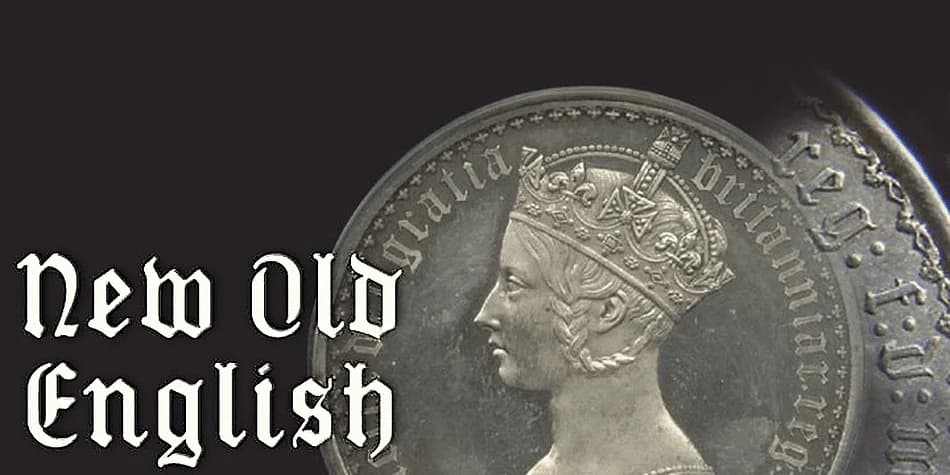
The genesis of New Old English, designed by K-Type, traces back to Victorian coins: specifically a mid-nineteenth century gothic crown and florin where a gothic script lowercase sat elegantly around the queen's profile and heraldic imagery. Those constrained spaces demanded ascenders and descenders far shorter than traditional Old English allowed, a practical constraint that became an aesthetic advantage. The result is a blackletter that feels warmer and less sharp than what you'd get from a pen nib, with thicker hairlines and circular punctuation softening its voice. Rather than the angular precision you might expect, the letterforms carry the rounded, die-struck quality of metal coins struck under pressure.
What distinguishes this face is how deliberately the capitals were designed to match the lowercase. Instead of the wide, ornamental characters typical of blackletter, these capitals are narrower and simpler, creating genuine visual harmony across both cases. Text set entirely in capitals actually reads well, which opens real possibilities: vintage whiskey labels, apothecary packaging, antique book covers, and formal Victorian invitations all work beautifully with a blackletter that handles small sizes and all-caps settings without strain. The font suits designers seeking that historical or gothic character without the excessive flamboyance that usually accompanies it. Get New Old English on Creative Fabrica.
Style & Use Cases
- Overall Style
- Ornate, Gothic
- Use Case
- Logos, Certificates
- Ideal For
- medieval themes, band merch, and tattoo lettering
- Pairs With
- a clean sans-serif for body text
How to Install New Old English Font
Step-by-step instructions for every platform
- 1Download the New Old English font file (.ttf or .otf).
- 2Locate the downloaded file in your Downloads folder.
- 3Right-click the font file.
- 4Select "Install" to install for the current user, or "Install for all users" to make it available system-wide.
- 5New Old English is now available in Word, Photoshop, Illustrator, and all other apps.


Browse fonts by theme
Curated collections →Saw a font in a picture? Identify any font from an image with our free Font Finder.
More Blackletter Fonts
Browse all →







What pairs well with New Old English Font?
New Old English Font is a blackletter font that shines as a display or heading face. Pair it with a clean serif or sans-serif font for body text — the contrast creates a clear hierarchy while the two styles stay balanced and easy to read.



New Old English Font
by K-Type
Reviewed by the FontBoxDL team · Updated June 2026