 Firefox
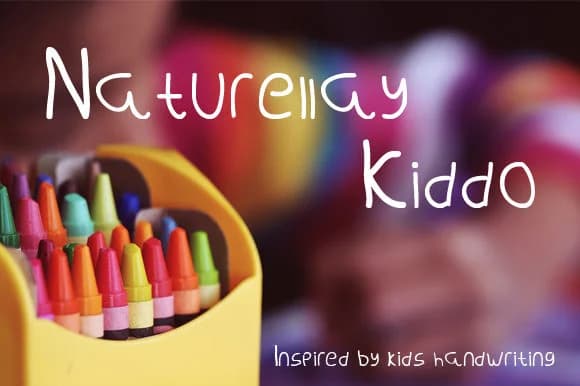
About Naturellay Kiddo Font
Imagine your daughter's birthday invitation arriving in the mailbox with lettering that looks exactly like she wrote it herself. That's the spirit of Naturellay Kiddo, a playful script font created by Cocoriscranjy that captures the genuine charm of children's handwriting. Rather than trying to look polished or perfect, it embraces the loose, authentic energy of how kids actually write when they're excited about something important.
This font shines for a wide range of projects: children's book covers and storybook illustration typography, custom birthday party invitations, scrapbooking page layouts, and craft supply labels or gift tags. Its letterforms have plenty of character and irregular spacing that makes them feel human and spontaneous rather than sterile. Naturellay Kiddo maintains its warmth and readability even when scaled large for titles and headlines, so you don't have to compromise on size to preserve the whimsical quality that makes the font special.
The loose, energetic strokes stay bold and visible at tiny scales all the way up to oversized dimensions, from a gift tag on a wrapped present to a multi-line scrapbook headline spread. Pick up Naturellay Kiddo on Creative Fabrica and bring authentic youthful energy into your next design project.
Style & Use Cases
- Overall Style
- Elegant, Flowing, Naturellay Kiddo
- Use Case
- Invitations, Branding
- Ideal For
- wedding stationery, greeting cards, and signatures
- Pairs With
- a simple uppercase sans
How to Install Naturellay Kiddo Font Font
Step-by-step instructions for every platform
- 1Download the Naturellay Kiddo Font font file (.ttf or .otf).
- 2Locate the downloaded file in your Downloads folder.
- 3Right-click the font file.
- 4Select "Install" to install for the current user, or "Install for all users" to make it available system-wide.
- 5Naturellay Kiddo Font is now available in Word, Photoshop, Illustrator, and all other apps.
More by Cocoriscranjy
View all →
Browse fonts by theme
Curated collections →Saw a font in a picture? Identify any font from an image with our free Font Finder.
More Script Handwritten Fonts
Browse all →







What pairs well with Naturellay Kiddo Font?
Naturellay Kiddo Font is a script font that shines as a display or heading face. Pair it with a clean sans-serif or serif font for body text — the contrast creates a clear hierarchy while the two styles stay balanced and easy to read.



Naturellay Kiddo Font
Reviewed by the FontBoxDL team · Updated June 2026