 Firefox
 1 / 5
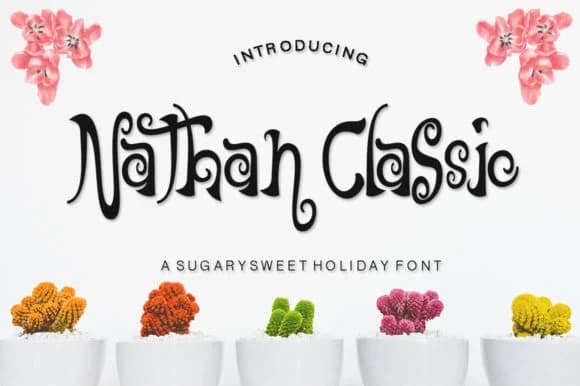
1 / 5About Nathan Classic Font
This script feels refined yet approachable, with enough personality to stand out without trying too hard. Nathan Classic, created by IM Studio, is a handwritten typeface that bridges the gap between formal elegance and organic warmth without sacrificing clarity.
The font excels in wedding invitation suites, where traditional sophistication meets contemporary sensibility. It works equally well for artisan product labels, from specialty coffee packaging to small-batch skincare lines that want their handmade story to come through visually. Greeting card designs benefit from the typeface's consistent letterforms, and boutique branding also succeeds when this script carries the visual voice. You get the legibility needed for smaller applications while keeping that authentic hand-drawn quality that makes readers feel a genuine connection to the brand behind the work.
Combine Nathan Classic with a straightforward sans-serif for extended body text. This pairing ensures your design stays readable without losing the personality the script provides, creating visual hierarchy without awkward contrast. The script shines brightest as a headline or accent font, drawing the eye while supporting rather than overwhelming your message. Find Nathan Classic on Creative Fabrica and let it bring some honest handwriting to your next design.
Style & Use Cases
- Overall Style
- Elegant, Flowing, Nathan Classic
- Use Case
- Invitations, Branding
- Ideal For
- wedding stationery, greeting cards, and signatures
- Pairs With
- a simple uppercase sans
How to Install Nathan Classic Font Font
Step-by-step instructions for every platform
- 1Download the Nathan Classic Font font file (.ttf or .otf).
- 2Locate the downloaded file in your Downloads folder.
- 3Right-click the font file.
- 4Select "Install" to install for the current user, or "Install for all users" to make it available system-wide.
- 5Nathan Classic Font is now available in Word, Photoshop, Illustrator, and all other apps.
More by IM Studio
View all →
Browse fonts by theme
Curated collections →Saw a font in a picture? Identify any font from an image with our free Font Finder.
More Script Handwritten Fonts
Browse all →







What pairs well with Nathan Classic Font?
Nathan Classic Font is a script font that shines as a display or heading face. Pair it with a clean sans-serif or serif font for body text — the contrast creates a clear hierarchy while the two styles stay balanced and easy to read.



Nathan Classic Font
by IM Studio
Reviewed by the FontBoxDL team · Updated September 2026