 Firefox
 1 / 8
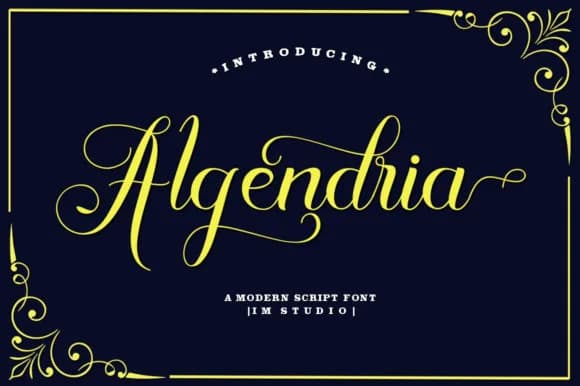
1 / 8About Algendria Font
Algendria by IM Studio is a fluid handwritten script that brings personality and movement to any design project. Unlike the cookie-cutter fonts that dominate design libraries, Algendria captures the organic quality of genuine penmanship while maintaining the legibility modern users expect. This script flows naturally whether applied to a single word or a full passage, making it equally at home in both headline and body applications. The versatility of Algendria shines across several specific use cases. Designers frequently deploy it for personalized wedding invitation suites where guests want more than the standard templated look. Social media creators use it to craft eye-catching story graphics and caption overlays that stand out in crowded feeds. Small business owners appreciate its suitability for product labeling on artisanal goods, from handmade cosmetics to specialty food packaging. Lettering artists and hand-lettering enthusiasts have also found it valuable for creating custom signage and decorative wall art that looks authentically hand-drawn without requiring hours at the drawing board. Algendria manages the difficult balance between elegance and casual accessibility, formal enough for professional correspondence yet expressive enough for creative experimentation. This makes it an effective choice for anyone seeking a handwritten aesthetic without sacrificing clarity or polish. Discover how Algendria can enhance your next project by downloading it from Creative Fabrica.
Style & Use Cases
- Overall Style
- Elegant, Flowing, Algendria
- Use Case
- Invitations, Branding
- Ideal For
- wedding stationery, greeting cards, and signatures
- Pairs With
- a simple uppercase sans
How to Install Algendria Font Font
Step-by-step instructions for every platform
- 1Download the Algendria Font font file (.ttf or .otf).
- 2Locate the downloaded file in your Downloads folder.
- 3Right-click the font file.
- 4Select "Install" to install for the current user, or "Install for all users" to make it available system-wide.
- 5Algendria Font is now available in Word, Photoshop, Illustrator, and all other apps.
More by IM Studio
View all →
Browse fonts by theme
Curated collections →Saw a font in a picture? Identify any font from an image with our free Font Finder.
More Script Handwritten Fonts
Browse all →







What pairs well with Algendria Font?
Algendria Font is a script font that shines as a display or heading face. Pair it with a clean sans-serif or serif font for body text — the contrast creates a clear hierarchy while the two styles stay balanced and easy to read.



Algendria Font
by IM Studio
Reviewed by the FontBoxDL team · Updated May 2026