 Firefox
 1 / 6
1 / 6About MyPimp Font
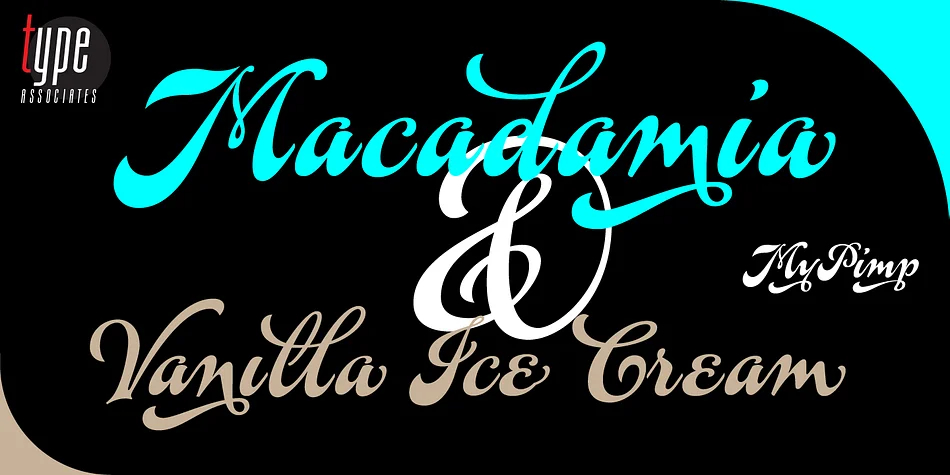
MyPimp by Type Associates is a bold connected script with genuine hand-lettered character. The letters flow together with ornate swashes and flourishes at word endings, giving the typeface that confident, decorative personality that works beautifully in display settings. Hand-drawn on paper and refined through meticulous OpenType programming, the font includes extensive ligatures and underscores that add visual richness without overwhelming the viewer.
This typeface shines for wedding invitation suites, luxury cosmetics and skincare packaging, event signage and poster headings, and greeting card designs. The swashy endpoints and connected letterforms make it particularly strong for brands that need personality without veering into visual chaos. Logo work especially benefits from that intentional, artistic touch, particularly for boutique and independent brands looking to establish a distinctive visual identity. The comprehensive ligature set means you can customize how individual words look, tailoring their appearance to match each project's voice and personality with precision. Because it was hand-drawn on paper and built with rigorous testing, you get reliable performance across applications and sizes. Grab it from Creative Fabrica and explore what this bold script can do for your next project.
Style & Use Cases
- Overall Style
- Elegant, Flowing
- Use Case
- Invitations, Branding
- Ideal For
- wedding stationery, greeting cards, and signatures
- Pairs With
- a simple uppercase sans
How to Install MyPimp Font
Step-by-step instructions for every platform
- 1Download the MyPimp font file (.ttf or .otf).
- 2Locate the downloaded file in your Downloads folder.
- 3Right-click the font file.
- 4Select "Install" to install for the current user, or "Install for all users" to make it available system-wide.
- 5MyPimp is now available in Word, Photoshop, Illustrator, and all other apps.
More by Type Associates
View all →
Browse fonts by theme
Curated collections →Saw a font in a picture? Identify any font from an image with our free Font Finder.
More Script Handwritten Fonts
Browse all →







What pairs well with MyPimp Font?
MyPimp Font is a script font that shines as a display or heading face. Pair it with a clean sans-serif or serif font for body text — the contrast creates a clear hierarchy while the two styles stay balanced and easy to read.




MyPimp Font
Reviewed by the FontBoxDL team · Updated July 2026