 Firefox
 1 / 7
1 / 7About Marlin Font
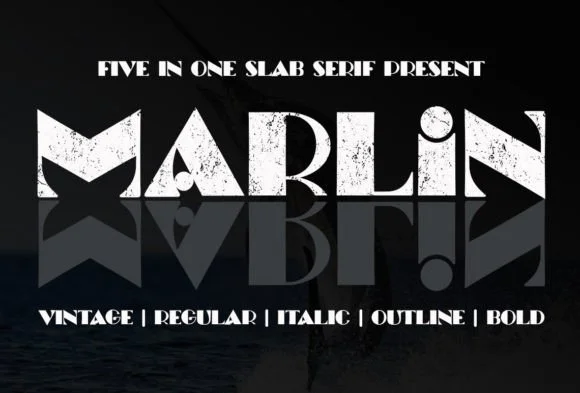
A rounded slab serif with Art-Deco bones and soft edges, Marlin by Rulihoki Studio brings genuine warmth to projects that need both confidence and approachability in equal measure. The typeface balances smooth letterforms with deliberate thickness, creating a distinctive personality that feels vintage without veering into pure pastiche or heavy nostalgia. Its character works across display settings and functional type applications with surprising versatility, from headlines to body text and everything between.
You'll see Marlin deliver strongest results in wedding invitation suites, where it grounds elegant compositions without overshadowing surrounding design elements or flourishes. Farmhouse-style home decor signage, vintage-inspired t-shirt graphics, magazine covers, greeting card layouts, and small-batch packaging all gain immediate presence through its balanced weight and warmth. Branding systems built on Marlin gain distinctive recognition, especially when clients value a custom, considered feel over mass-produced aesthetics.
This font works best for designers and business owners creating work that bridges playful and serious registers without feeling caught between them. Hand-lettered social graphics, complete identity systems, promotional materials, and point-of-purchase displays all perform well with type that communicates character and clear intention. Marlin is available on Creative Fabrica for your next collection.
Style & Use Cases
- Overall Style
- Sturdy, Confident, Slab Serif
- Use Case
- Headlines, Merch
- Ideal For
- vintage posters, logos, and product packaging
- Pairs With
- a light sans-serif
How to Install Marlin Font
Step-by-step instructions for every platform
- 1Download the Marlin font file (.ttf or .otf).
- 2Locate the downloaded file in your Downloads folder.
- 3Right-click the font file.
- 4Select "Install" to install for the current user, or "Install for all users" to make it available system-wide.
- 5Marlin is now available in Word, Photoshop, Illustrator, and all other apps.
Browse fonts by theme
Curated collections →Saw a font in a picture? Identify any font from an image with our free Font Finder.
More Slab Serif Fonts
Browse all →







What pairs well with Marlin Font?
Marlin Font is a slab serif font that shines as a display or heading face. Pair it with a clean sans-serif or serif font for body text — the contrast creates a clear hierarchy while the two styles stay balanced and easy to read.




Marlin Font
Reviewed by the FontBoxDL team · Updated September 2026