 Firefox
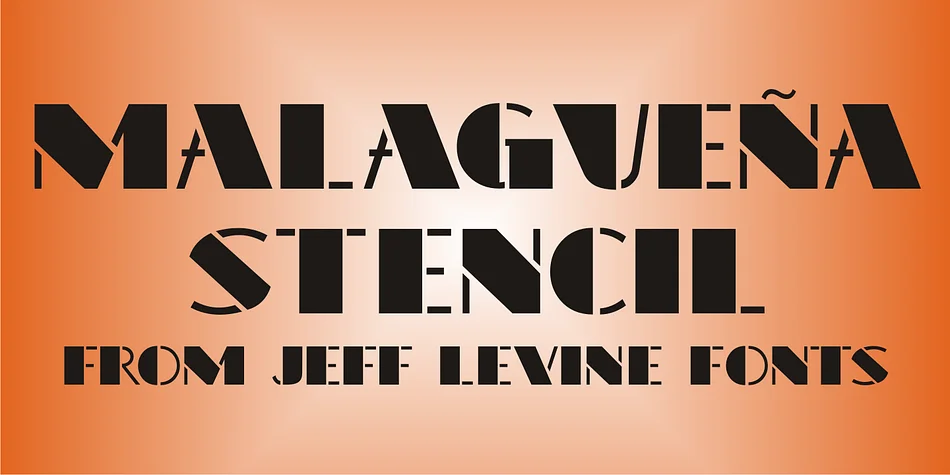
About MALAGUEñA STENCIL JNL Font
Picture yourself designing a vintage jazz poster or packaging for a speakeasy-themed product line. You need typeface letters that feel genuinely rooted in 1920s lettering, not a generic imitation. Malagueña Stencil JNL, created by Jeff Levine Fonts, pulls directly from hand lettering discovered on original Art Deco sheet music, giving your work an authentic period aesthetic. This design carries historical significance beyond its visuals: Malagueña is the famous composition by Cuban musician Ernesto Lecuona, written in 1928 and originally part of his Suite Andalucia. It became a standard in jazz ensembles and marching bands worldwide, adding cultural depth to any design that references it.
Stencil lettering like this shines for vinyl record labels, retro nightclub branding, swing-era event suites, and burlesque or cabaret graphics where period character matters. Each letterform is built with clean, geometric qualities distinctive to that era, with cut separations between strokes that feel intentional rather than decorative. The construction also means the font translates beautifully if you're physically cutting templates, layering colors in print, or working with actual stencil techniques. Letters maintain that period-accurate punch while staying readable at both display and headline sizes.
Grab Malagueña Stencil JNL on Creative Fabrica, and you'll have a typeface with real historical roots for your vintage and retro projects.
Style & Use Cases
- Overall Style
- Bold, Distinctive
- Use Case
- Headlines, Posters
- Ideal For
- logos, packaging, and standout titles
- Pairs With
- a neutral sans-serif
How to Install MALAGUEñA STENCIL JNL Font
Step-by-step instructions for every platform
- 1Download the MALAGUEñA STENCIL JNL font file (.ttf or .otf).
- 2Locate the downloaded file in your Downloads folder.
- 3Right-click the font file.
- 4Select "Install" to install for the current user, or "Install for all users" to make it available system-wide.
- 5MALAGUEñA STENCIL JNL is now available in Word, Photoshop, Illustrator, and all other apps.
More by Jeff Levine Fonts
View all →



Browse fonts by theme
Curated collections →Saw a font in a picture? Identify any font from an image with our free Font Finder.
More Decorative Fonts
Browse all →







What pairs well with MALAGUEñA STENCIL JNL Font?
MALAGUEñA STENCIL JNL Font is a decorative font that shines as a display or heading face. Pair it with a clean sans-serif or serif font for body text — the contrast creates a clear hierarchy while the two styles stay balanced and easy to read.




MALAGUEñA STENCIL JNL Font
Reviewed by the FontBoxDL team · Updated June 2026