 Firefox
 1 / 8
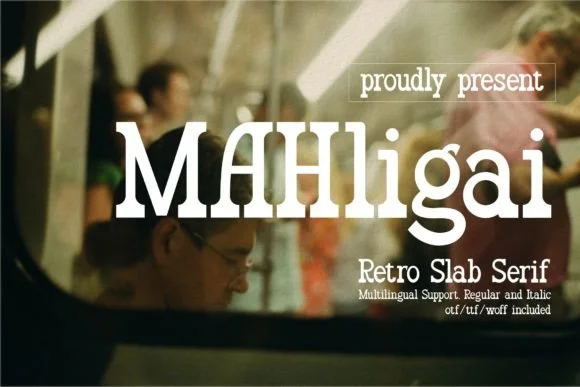
1 / 8About Mahligai Font
Mahligai is a slab-serif typeface with substantial serifs that anchor each letterform to the baseline, giving it the weight and raw presence of weathered saloon signs and heritage Western branding. Created by Denustudios, this font channels that frontier aesthetic without sacrificing readability or losing any character in the process. The thick strokes and blocky terminals feel earned rather than decorative, evoking the grit of old hand-lettered signage and vintage americana.
You'll find this typeface working across vintage-inspired apparel graphics, band merchandise label designs, and rodeo event posters where that bold character demands attention. Craft makers gravitate toward it for laser-cut wooden signs and branding work for country boutiques, farm stands, or rustic hospitality spaces. The boldness carries through on smaller formats too, making it genuinely reliable for embroidered workwear patches and whiskey bottle labels where visual impact has to compete for space. That Western confidence reads clear at every size.
This is the font for designers building rustic, retro, or deliberately rough-edged work that needs to feel genuine and grounded. If you're creating vintage-feeling collateral or chasing that weathered Americana vibe without leaning on digital effects, Mahligai delivers the authenticity your project needs. You can grab it on Creative Fabrica.
Style & Use Cases
- Overall Style
- Sturdy, Confident, Western
- Use Case
- Headlines, Merch
- Ideal For
- vintage posters, logos, and product packaging
- Pairs With
- a light sans-serif
How to Install Mahligai Font
Step-by-step instructions for every platform
- 1Download the Mahligai font file (.ttf or .otf).
- 2Locate the downloaded file in your Downloads folder.
- 3Right-click the font file.
- 4Select "Install" to install for the current user, or "Install for all users" to make it available system-wide.
- 5Mahligai is now available in Word, Photoshop, Illustrator, and all other apps.
More by Denustudios
View all →
Browse fonts by theme
Curated collections →Saw a font in a picture? Identify any font from an image with our free Font Finder.
More Slab Serif Fonts
Browse all →







What pairs well with Mahligai Font?
Mahligai Font is a slab serif font that shines as a display or heading face. Pair it with a clean sans-serif or serif font for body text — the contrast creates a clear hierarchy while the two styles stay balanced and easy to read.




Mahligai Font
by Denustudios
Reviewed by the FontBoxDL team · Updated August 2026