
 1 / 6
1 / 6About Losser Font
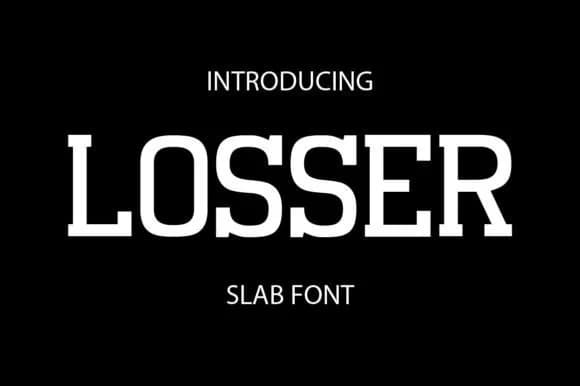
Losser by gunaloe12 is a sturdy slab serif built for impact, blending retro boldness with contemporary edge. The geometric proportions and hefty strokes give it real presence on the page, making it an essential choice for any project that needs to communicate with authority and confidence. This is a font that speaks rather than whispers, with the kind of character that anchors a visual identity from the first glance.
The range of applications runs surprisingly deep. Losser excels in sports branding and team identities where you need immediate visual punch and lasting credibility with an audience. Packaging for craft beverages, artisan goods, and specialty food labels gains genuine authenticity from its vintage-modern sensibility. Logo design gains commanding presence across applications, from law firms to streetwear brands to hospitality concepts. Social media graphics and poster campaigns take on real weight and distinction when set in this typeface. Editorial headlines and book covers benefit from the gravitas it brings to the page. Small sizes hold up well across scales, so it performs equally from product labels to website headers without sacrificing character or readability.
Grab Losser on Creative Fabrica and add this powerful, versatile slab serif to your design library today.
Style & Use Cases
- Overall Style
- Sturdy, Confident, Logo
- Use Case
- Headlines, Merch
- Ideal For
- vintage posters, logos, and product packaging
- Pairs With
- a light sans-serif
How to Install Losser Font
Step-by-step instructions for every platform
- 1Download the Losser font file (.ttf or .otf).
- 2Locate the downloaded file in your Downloads folder.
- 3Right-click the font file.
- 4Select "Install" to install for the current user, or "Install for all users" to make it available system-wide.
- 5Losser is now available in Word, Photoshop, Illustrator, and all other apps.
More by gunaloe12
View all →
Browse fonts by theme
Curated collections →Saw a font in a picture? Identify any font from an image with our free Font Finder.
More Slab Serif Fonts
Browse all →







What pairs well with Losser Font?
Losser Font is a slab serif font that shines as a display or heading face. Pair it with a clean sans-serif or serif font for body text — the contrast creates a clear hierarchy while the two styles stay balanced and easy to read.



Losser Font
by gunaloe12
Reviewed by the FontBoxDL team · Updated August 2026