
 1 / 8
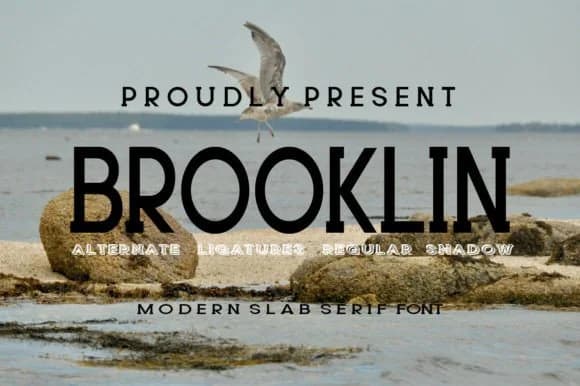
1 / 8About Brooklin Font
Brooklin carries that rare balance between bold confidence and quiet refinement. Created by gunaloe12, this slab serif comes in both regular and shadow variants, giving you flexibility for layered compositions and added depth.
The font excels wherever personality drives the design. You'll find it earning attention on luxury fashion brand identities, wedding invitation suites with careful, elegant typography, high-impact magazine and book cover headers, and packaging design for boutique lifestyle products. Each weight carries that distinctive slab character without feeling trendy or temporary. Social media headers for upscale lifestyle brands and movie title sequences both benefit from its structured presence and visual weight. The letterforms perform equally well across headlines and display-heavy branding applications, balancing masculine strength with approachable warmth. There's enough distinctive character to anchor a brand identity, yet enough restraint to feel contemporary rather than dated.
For body copy or longer passages, pair Brooklin with a clean, understated sans-serif that won't compete with its personality. The contrast keeps your designs readable and visually coherent across different scales and applications. You'll find Brooklin on Creative Fabrica, where you can experiment with pairings until the combination feels right.
Style & Use Cases
- Overall Style
- Sturdy, Confident, Logo
- Use Case
- Headlines, Merch
- Ideal For
- vintage posters, logos, and product packaging
- Pairs With
- a light sans-serif
How to Install Brooklin Font
Step-by-step instructions for every platform
- 1Download the Brooklin font file (.ttf or .otf).
- 2Locate the downloaded file in your Downloads folder.
- 3Right-click the font file.
- 4Select "Install" to install for the current user, or "Install for all users" to make it available system-wide.
- 5Brooklin is now available in Word, Photoshop, Illustrator, and all other apps.
More by gunaloe12
View all →

Browse fonts by theme
Curated collections →Saw a font in a picture? Identify any font from an image with our free Font Finder.
More Slab Serif Fonts
Browse all →







What pairs well with Brooklin Font?
Brooklin Font is a slab serif font that shines as a display or heading face. Pair it with a clean sans-serif or serif font for body text — the contrast creates a clear hierarchy while the two styles stay balanced and easy to read.



Brooklin Font
by gunaloe12
Reviewed by the FontBoxDL team · Updated September 2026